
Best Time to Stream on Twitch: Measured Data, Not Guesses
Peak viewers and peak competition are the same hours, so the metric that matters is viewers per live channel. Dated Twitch data, category saturation ratios, and the free first-party tool that answers this per category.
There is no single best hour, and every article that gives you one is guessing. Over the seven days to August 15, 2026, Twitch averaged 2,225,996 concurrent viewers across 91,096 concurrent live channels (TwitchTracker). That works out to 24.4 viewers per live channel, and that supply-and-demand ratio tells you more about your odds of being found than the raw viewer count does. Twitch also publishes the hourly figures for your own category, for free, inside your dashboard.
Every Twitch and TwitchTracker figure below was read from its source on August 15, 2026, and each one is dated and sourced in the text or the table caption.
The short answer
Audience and competition rise and fall together, but not at the same rate. So the metric worth watching is viewers per live channel, not viewers.
Here is one measured example. On Saturday, August 15, 2026, at 13:12 UTC, Twitch had lost almost none of its audience versus its daily average, but had lost nearly a quarter of its channels.
Source: twitchtracker.com/statistics/viewers and /statistics/channels, read at 13:12–13:15 UTC on Saturday, August 15, 2026.
| Metric | At that moment | 24-hour average | Change |
|---|---|---|---|
| Concurrent viewers | 2,235,789 | 2,262,988 | −1.2% |
| Concurrent live channels | 72,793 | 94,854 | −23.3% |
| Viewers per channel | 30.7 | 23.9 | +28.5% |
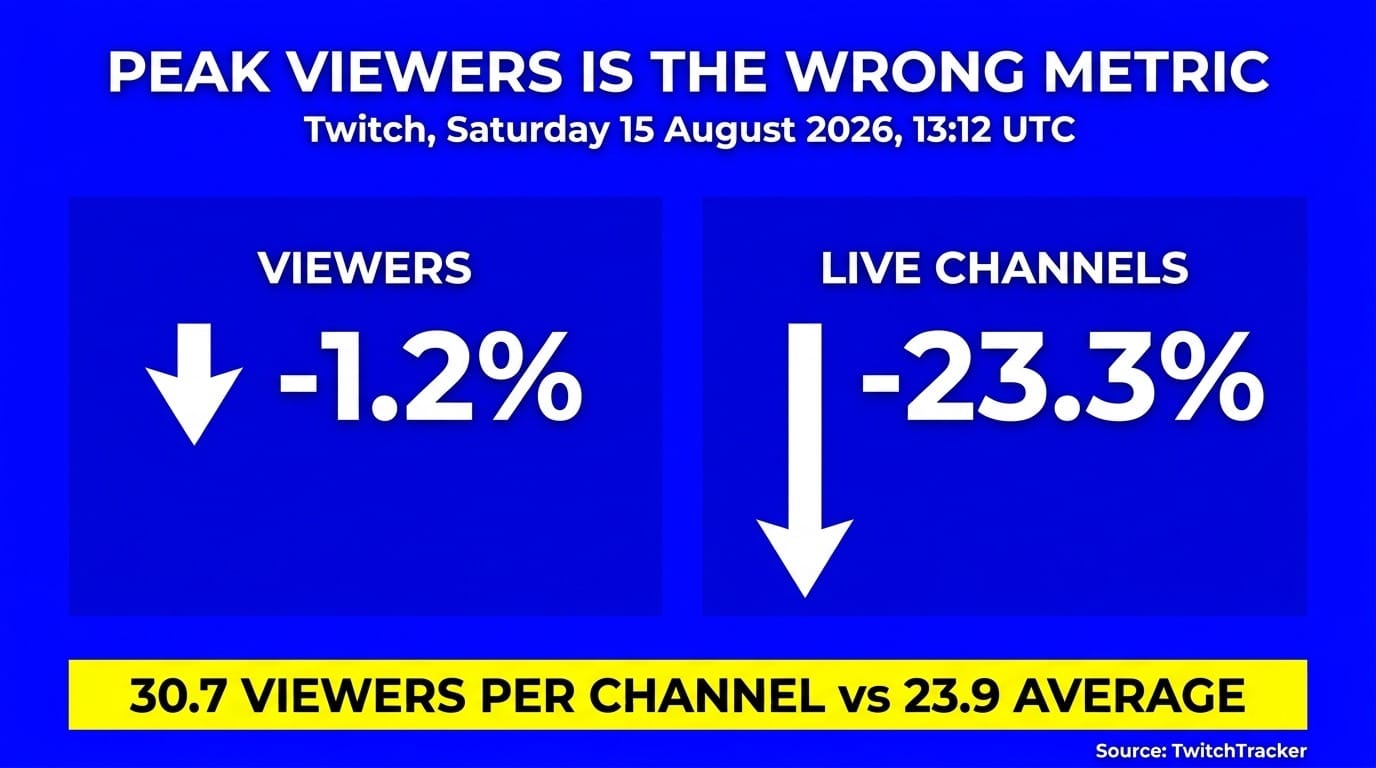
This is one observation, not a curve. It does not prove 13:00 UTC is good every Saturday, and it does not identify a peak in either direction. What it shows is that viewer demand and channel supply can sit at very different distances from their own daily averages at the same moment. That gap is the thing worth hunting for, and the next section covers where to find it for your category.
Why "peak viewers" is the wrong metric
Total viewers tells you how big the room is. Viewers per live channel tells you how contested it is. It is a category-wide average rather than a forecast of what you personally will get, but it is the closest public proxy for how crowded the directory is when you go live.
Platform-wide numbers from TwitchTracker's statistics page, read August 15, 2026:
| Window | Avg concurrent viewers | Avg concurrent channels | Viewers per channel |
|---|---|---|---|
| 7 days to Aug 15, 2026 | 2,225,996 | 91,096 | 24.4 |
| July 2026 monthly avg | 2,057,184 | 89,589 | 23.0 |
| January 2026 monthly avg | 2,124,774 | 98,231 | 21.6 |
| Full-year 2025 avg | ~2,167,000 (−9% YoY) | ~93,200 (−3% YoY) | ~23.3 |
The ratios are arithmetic on the two published columns, not a figure TwitchTracker publishes. Twitch also logged its all-time concurrent-viewer peak of 13,819,442 on July 26, 2025.
Note what January to July shows. Viewers fell, channels fell faster, and the ratio improved. A quieter Twitch can be a better Twitch to start on.
What Twitch says the directory actually does
Twitch's own analytics documentation defines Est. Browse Position as "an estimate of where your stream might show up on the Browse page when sorted from high to low, based on your average viewers from the last 30 days."
That is Twitch confirming the directory's default sort. High viewer counts first. If you go live into a category that has 5,000 other channels live, you are at the bottom of a very long list.
The Discovery Feed is a different surface. Twitch announced on April 30, 2024 that it was rolling out to all users, and it serves clips in a personalised vertical scroll rather than sorting by live viewer count. That feed is asynchronous, so a clip can surface days after you streamed it.
So timing still drives where you land in the live directory. It has much less bearing on the Discovery Feed.
The real answer is per-category, and Twitch gives it to you free
This is the part almost nobody mentions. Twitch built the tool that answers this exact question, per category, hour by hour, and put it in the Creator Dashboard.
From Twitch's channel analytics help page, verbatim:
"Research page — Plan your upcoming streams with the global Twitch data that is surfaced on this page. Gain insight into panels like Time to Stream to learn what is the best day and time to stream in a specific category."
How to open Time to Stream
- Open your Twitch Creator Dashboard.
- Go to Analytics, then Research.
- Find the Time to Stream panel.
- Select the category you plan to stream.
- Choose the window. Streams Charts reported 7-day and 28-day options when the tool launched.
- Read the daily and hourly view. Each cell shows channels, viewers, and average viewers per channel.
Reading it correctly
The timezone question has a documented answer. Twitch's help page states: "Stream data throughout your Analytics is displayed in your local time zone, with an exception to the Earnings page."
So the hours you see are your hours. No conversion needed.
One thing to know before you act on it. Outliers are filtered, but the published figures differ by panel. Twitch's help page says that for Avg. Viewers:Channels ratios, "large streams with viewership in the top 5% of a category are considered outliers, and are not factored into" the calculation. Streams Charts reported a top-2% exclusion for Time to Stream when it launched in 2023. Treat the filter as real but do not assume one threshold covers both panels.
Category Suggestions, if you have it
There is a related panel worth knowing about, though it is not on the Research page and you may not have it. Twitch documents Category Suggestions under the Analytics Overview, describing it as showing "categories with favorable Avg. Viewer:channel ratios that may increase your chance of being discovered." It is ranked, in Twitch's words, "by factors such as" average hours viewed versus average hours broadcast in the past 7 days, similar categories to the ones you watch, and estimated browse position.
Two limits Twitch states plainly. It is an experiment, and "experiments are available to a limited number of channels." It is also gaming-only: "we're not able to give suggestions on non-gaming categories just yet," and eligibility requires that you "must have recently streamed in a gaming category." If you do not see it, that is why.
Time to Stream reached all users on September 6, 2023, confirmed by a Twitch admin on the official UserVoice board. It has been sitting there ever since, free, and it is more specific than any advice on this page.
Category saturation right now (August 2026)
The spread across categories is wide, and it is measurable in a way that hourly data is not. Here is where the major ones sit.
Source: twitchtracker.com/games and twitchtracker.com/games/average-channels, 7-day averages, read August 15, 2026.
| Category | Avg viewers | Avg channels | Viewers per channel |
|---|---|---|---|
| Escape from Tarkov | 120,614 | 1.0K | ≈121 |
| Dota 2 | 88,724 | 991 | ≈90 |
| Just Chatting | 276,584 | 4.4K | ≈63 |
| League of Legends | 103,989 | 2.0K | ≈52 |
| Counter-Strike | 79,431 | 1.6K | ≈50 |
| Minecraft | 110,810 | 2.9K | ≈38 |
| Grand Theft Auto V | 65,221 | 2.3K | ≈28 |
| VALORANT | 63,862 | 2.7K | ≈24 |
| Marvel Rivals | 27,721 | 1.7K | ≈16 |
| Dead by Daylight | 26,630 | 2.0K | ≈13 |
| Apex Legends | 22,809 | 2.1K | ≈11 |
| Fortnite | 41,893 | 5.5K (most-streamed) | ≈7.6 |
Two caveats you need before you use that table:
- Channel counts are published rounded to 0.1K, so the ratios carry roughly ±5% error.
- These are means, and means are inflated by mega-streamers. Twitch strips outliers from its own ratios for exactly this reason.
The median reality check
Averages describe the category. Medians describe you. TwitchTracker publishes a separate ranking "based on the median viewership over the past 7 days."
Source: twitchtracker.com/games/to-stream, 7-day medians, read August 15, 2026. Selected rows from TwitchTracker's top 20, not the full ranking.
| Category | Median viewers | Avg channels |
|---|---|---|
| Rise Online | 63.6 | 14 |
| Heroes of Might and Magic III | 19.4 | 25 |
| Endacopia | 18.3 | 14 |
| The Skin Stapler | 16.9 | 22 |
| EVE Online | 15.4 | 21 |
| Poker | 13.1 | 67 |
| Special Events | 10.7 | 94 |
| DJs | 10.6 | 212 |
Not one of the top-20 categories by viewership appears on that list. The category topping TwitchTracker's median ranking sits at about 64 median viewers, and it is a game most people have never heard of.
Fortnite averages 41,893 viewers. It also carries the most live channels on the platform, which drags its viewers-per-channel figure down to roughly 7.6. Escape from Tarkov has under a fifth of Fortnite's channel count and nearly three times its audience.
Best days of the week
Weekend audiences are widely assumed to be the largest, and the all-time concurrent record of 13,819,442 was set on a Saturday, July 26, 2025. That is one event day, not a weekly pattern.
Treat the weekend rule as an assumption rather than a measurement. Channel counts plausibly rise alongside the audience, which would cancel the benefit, and no free public source publishes a global day-by-day Twitch ratio either way.
Time to Stream has a day-level view for your specific category. Use that instead of a universal weekday claim, because a universal weekday claim does not exist.
Timezone planning grid
There is no citable public source for hour-by-hour Twitch concurrency by region. So the table below is not measured Twitch data.
These are local evening prime-time windows converted across zones, a planning grid rather than measured Twitch data. For measured data in your category, use Time to Stream.
| Region | Local evening prime time | UTC | ET | PT | CET |
|---|---|---|---|---|---|
| North America (East) | 19:00–23:00 ET | 00:00–04:00 (+1) | 19:00–23:00 | 16:00–20:00 | 01:00–05:00 (+1) |
| North America (West) | 19:00–23:00 PT | 03:00–07:00 (+1) | 22:00–02:00 | 19:00–23:00 | 04:00–08:00 (+1) |
| Western/Central Europe | 19:00–23:00 CET | 18:00–22:00 | 13:00–17:00 | 10:00–14:00 | 19:00–23:00 |
| UK | 19:00–23:00 GMT | 19:00–23:00 | 14:00–18:00 | 11:00–15:00 | 20:00–00:00 |
| Korea / Japan | 19:00–23:00 KST/JST | 10:00–14:00 | 05:00–09:00 | 02:00–06:00 | 11:00–15:00 |
| Brazil | 19:00–23:00 BRT | 22:00–02:00 | 17:00–21:00 | 14:00–18:00 | 23:00–03:00 |
Offsets used: ET −5, PT −8, CET +1, GMT 0, KST/JST +9, BRT −3. These are standard-time offsets.
Daylight saving shifts every one of these rows by an hour, and the US, Europe, and Brazil do not switch on the same dates. Every competitor grid on this topic ignores that. Recheck your conversions in March and again in late October.
Now put the one measured row next to the grid. That 30.7 viewers-per-channel reading landed at 13:00 UTC, which in mid-August daylight time is mid-morning in New York, early morning in Los Angeles, mid-afternoon in Berlin, and late evening in Seoul. It sits well outside every prime-time window in the table, and it still carried a better ratio than the daily average. That is the argument for checking the unfashionable hours rather than defaulting to the obvious ones.
How to test your own best time
Global data gets you a starting slot. Your own data tells you whether it works for your channel.
Run an eight-week test and change only one variable:
- Hold the category constant. Switching game and hour at once tells you nothing.
- Pick two candidate slots from Time to Stream, ideally one inside a peak and one in a trough.
- Alternate them weekly, same weekday, same duration each time.
- Record from Stream Summary after each session: average viewers, unique viewers, chatters, new followers.
- Check the Browse page yourself at the start of each stream. Note how many channels are live in your category and where you land.
- Compare per-hour, not per-stream. A three-hour stream will beat a one-hour stream on totals regardless of the slot.
Alternating weekly over eight weeks gives you four sessions per slot. That is thin, but it beats a number someone published in 2022. Keep the log, because the platform's ratios shift month to month, as the January-to-July table above shows.
Before you run the test, make sure your output settings are not the thing costing you viewers. Our guide to the best bitrate for Twitch covers the settings that decide whether new arrivals stay past the first buffer.
Consistency beats the clock, and what the Schedule feature really does
A widely repeated claim says Twitch recommends channels with schedules to viewers browsing at specific times. Twitch's own documentation does not say that.
From Twitch's channel page setup help article, verbatim:
"Stream Schedules appear on the Following page and the search results page, so be sure to set up your schedule and keep it relevant!"
Two placements. The Following page and search results. No claim about the directory, the recommendation system, or the Discovery Feed.
That does not make the schedule useless. It makes its value a returning-viewer tool rather than a discovery tool. People who already follow you learn when to show up.
What the feature actually supports:
- Recurring weekly segments. Twitch's developer docs define these as "broadcasts that stream weekly on the same weekday and time of day (for example, Fridays at 10:30 AM)."
- Vacation Mode, which clears your schedule for a date range.
- Cancel on an individual segment.
- Specific Day scheduling, which Twitch states "is only available for Affiliate and Partners."
On stream length and frequency, be sceptical of the "3 to 5 hours, 3 to 5 days a week" advice. It is repeated everywhere and rests on no published study. What is documented is that the Schedule tool works in weekly recurrences, and Twitch publishes no maximum broadcast length. So pick a length you can actually repeat every week.
If you also publish to other platforms, the rules are more permissive than most people think. Simulcasting is allowed for all streamers unless you hold an exclusivity agreement with Twitch. Its simulcasting guidelines state that they apply "unless you have an agreement with Twitch that requires exclusivity." The conditions are that your Twitch stream must not be degraded relative to the other platform, and that you may not use Twitch to drive viewers to a stream running elsewhere at the same time. Our Twitch and YouTube multistreaming guide covers the current requirements, and the YouTube vs Twitch vs Kick comparison covers which one deserves your live hours in the first place.
When your best slot is a time you can't be awake for
Here is the practical problem with everything above. A favourable ratio is no use if it lands at an hour you cannot hold week after week, and the thin-competition hours often do. The 13:00 UTC reading is 6 AM in Los Angeles.
You have three options.
- Move your live hours. Best results, worst on your sleep, and hard to sustain weekly.
- Accept a worse ratio at an hour you can hold consistently.
- Keep the channel on air during those hours with pre-recorded content, and go live yourself when you can.
Option three is what a cloud streaming tool does. LiveReacting is built for it: upload a video, connect Twitch, go live with pre-recorded content in about five minutes, then leave it running.
The parts that matter once it is running:
- Playlists, so a channel can rotate hours of content instead of looping one file.
- Advanced scheduling and recurrence, so a slot can repeat weekly without you touching it.
- Free automatic encoding, so you upload the file you have rather than re-exporting it.
- Editing while the stream is live, so you can swap what plays next without ending the broadcast.
- RTMP output to any endpoint, with 5 destinations included.
Twitch publishes no maximum broadcast length, so an always-on channel is not something the platform caps. The 24/7 plan runs $39.99/mo for one concurrent stream at 1080p with unlimited duration.
For the mechanics of getting recorded footage onto Twitch, see how to stream a pre-recorded video on Twitch and, for gameplay specifically, how to stream pre-recorded gameplay on Twitch. If you want chat visible on the broadcast during those hours, the Twitch chat overlay tutorial walks through the setup.
FAQ
What is the best time to stream on Twitch? There is no global best hour, and any article naming one is guessing. Platform-wide, Twitch runs about 24 viewers per live channel (2,225,996 viewers across 91,096 channels, TwitchTracker, August 15, 2026), so target hours where channels drop faster than viewers. Your category's exact hours are in Creator Dashboard, Analytics, Research, Time to Stream.
Should I stream at peak or off-peak? It depends on your category, and the way to decide is the viewer-to-channel ratio rather than the raw audience. Off-peak hours can favour a small channel when competition thins faster than the audience does. One measured example, on Saturday, August 15, 2026 at 13:00 UTC: viewers 1.2% below the 24-hour average, channels 23.3% below, giving 30.7 viewers per channel against a 23.9 average.
Does Twitch tell me the best time to stream? Yes. Its help page says you can "gain insight into panels like Time to Stream to learn what is the best day and time to stream in a specific category." It shows daily and hourly data, with 7-day and 28-day windows reported when the tool launched, and it has been available to all users since September 6, 2023.
What timezone is Twitch analytics shown in? Your own. Twitch states: "Stream data throughout your Analytics is displayed in your local time zone, with an exception to the Earnings page."
Which Twitch category is easiest to get discovered in? Not the saturated ones. Fortnite is the most-streamed category at about 5.5K concurrent channels but averages roughly 7.6 viewers per channel, while Escape from Tarkov runs around 121 and Dota 2 around 90. By median, TwitchTracker's ranking is topped by Rise Online at 63.6, and none of the top-20 categories by viewership appear on it at all.
Does a stream schedule help discovery? Less than you have been told. Twitch's docs say only that schedules "appear on the Following page and the search results page," with no claim about the directory or recommendations. The real value is that existing followers know when to show up.
Are weekends the best time to stream? Probably not decisively, and it is an assumption rather than a measurement. The all-time record of 13,819,442 concurrent was set on Saturday, July 26, 2025, but that is one event day. No free public source publishes a global day-by-day Twitch ratio, so check the day-level view in Time to Stream for your category.
How long and how often should I stream? Twitch publishes no official guidance, and "3 to 5 hours, 3 to 5 days a week" has no study behind it. What is documented is that the Schedule tool supports weekly recurring slots, and Twitch publishes no maximum broadcast length, so choose a length you can repeat every week.
Does the Discovery Feed mean timing no longer matters? It matters less, and only for half of discovery. The Feed, which Twitch announced was rolling out to all users on April 30, 2024, serves clips algorithmically and is decoupled from when you streamed. The Browse directory still sorts by viewers high to low, and that half is governed entirely by when you go live.
Next step
Open Creator Dashboard, Analytics, Research, and read Time to Stream for the category you actually stream. It answers this question with your own timezone and current data, which no blog post can.
Then, if the best slots land at 4 AM, keep the channel on air with a 24/7 stream and save your live hours for when you are awake. For a wider view of what those hours are worth, see how much Twitch streamers really make.
Transform Your Live Streams with LiveReacting
Join 10,000+ streamers who are boosting engagement and viewership by adding pre-recorded videos, games, polls, and countdowns to their streams.
Try LiveReacting for free today and take your streams to the next level!