
Faceless YouTube Channel Automation: Run a 24/7 Stream Off-Camera
Build a faceless YouTube channel that runs itself. AI generators make clips, cloud storage feeds them in, and a 24/7 stream plays them non-stop. No camera.
A faceless YouTube channel lets you publish content without ever showing your face or recording your voice live. The 2026 version goes further: an automated pipeline where AI tools generate the clips, cloud storage collects them, and a 24/7 live stream plays them around the clock. You set it up once and it runs while you sleep.
This guide shows the exact hands-off workflow. It covers the pipeline, the tools, and how to keep the channel compliant with YouTube's rules.
The faceless automation pipeline
The whole system is four stages. Each one hands off to the next with no manual step in between.
| Stage | What happens | Tool |
|---|---|---|
| 1. Generate | AI writes, voices, and renders video clips | AI video generators (Pika, Runway, HeyGen, ElevenLabs) |
| 2. Collect | Finished files land in one folder | Google Drive or Dropbox |
| 3. Import | Files auto-add to a stream playlist | LiveReacting import or API |
| 4. Broadcast | The playlist plays live, non-stop | LiveReacting 24/7 stream to YouTube |
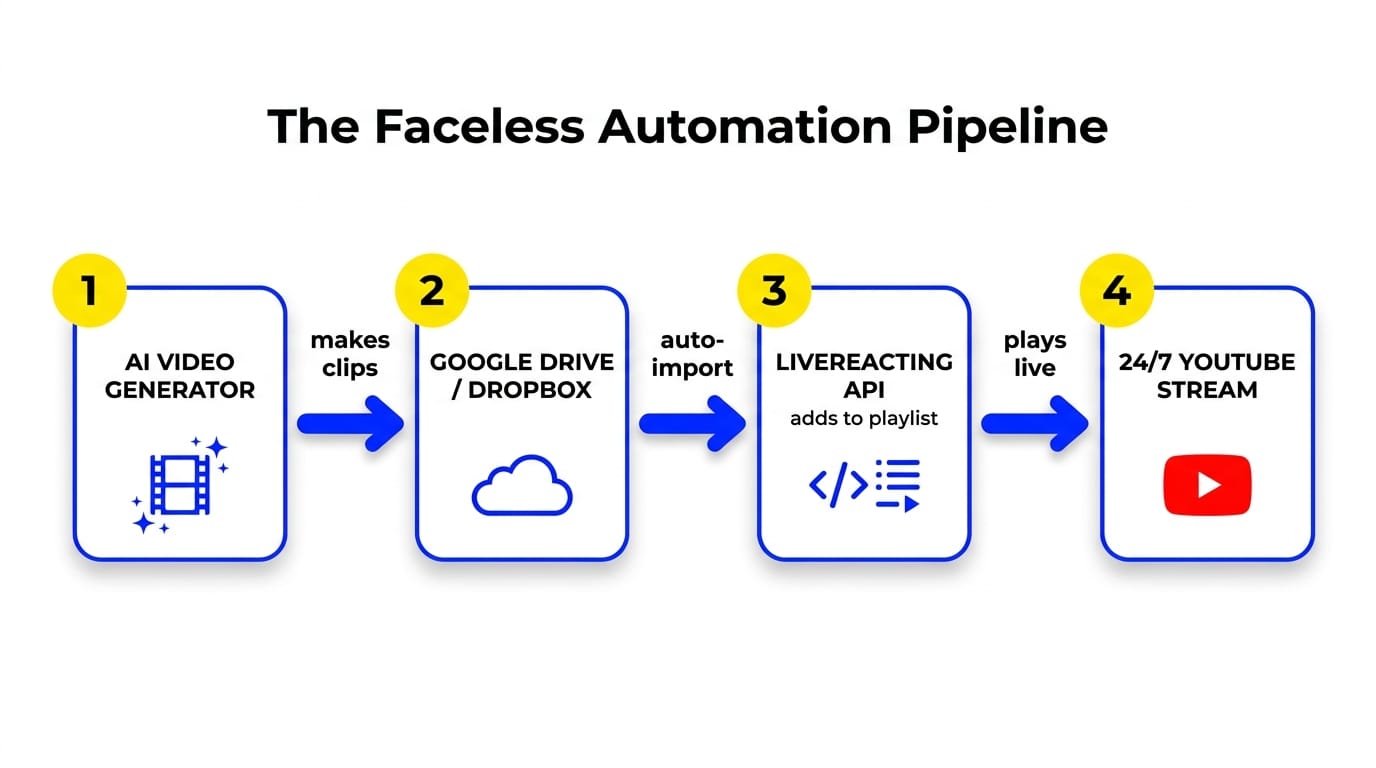
You appear at zero stages. The clips are AI-generated, the transfer is automatic, and the stream is cloud-hosted. Once it runs, your only job is refreshing the content library.
Stage 1: Generate the clips with AI
Faceless content is now cheap to produce. AI tools have dropped the cost of a short video from hundreds of dollars and days of editing to a few dollars and a couple of hours. That is why faceless automation is one of the fastest-growing formats on YouTube in 2026.
Pick tools that match your niche:
- Script and voice: ChatGPT or Claude for scripts, ElevenLabs for voiceover.
- Video: Runway, Pika, Higgsfield or HeyGen for AI avatars and B-roll. Higgsfield includes an AI Video Generator that's commonly used for exactly this kind of clip
- Assembly: an editor or an all-in-one faceless tool that outputs finished .mp4 files.
Not sure what to make? Our companion post on faceless YouTube channel ideas covers the niches that work. This piece is the how-to-run-it-hands-off half.
Stage 2: Collect files in cloud storage
Point your AI tools, or a simple automation, to save every finished clip into one Google Drive or Dropbox folder. This folder is the handoff point between production and broadcast.
Keep it clean:
- One folder per channel or per content block.
- Consistent file names so the running order is predictable.
- Only finished, rendered .mp4 or .mov files.
Stage 3: Import files into a playlist
Here is where the channel becomes hands-off. LiveReacting pulls videos straight from your cloud folder into a stream playlist. You do not download or re-upload anything.
Option A: Built-in import (no code)
In the LiveReacting File Manager, click import file or folder from Google Drive, Dropbox or YouTube, paste the folder link, and import. The files land in your media library, encoded and ready. Then drag them into a video playlist layer in the pre-recorded stream studio. Full walkthrough: how to stream a video playlist.
This is the set-and-forget path. It fits most faceless creators.
Option B: The LiveReacting API (fully automated)
For a channel that updates itself with no clicks at all, the LiveReacting API automates the whole import-and-schedule step. It can import from a cloud URL, build a playlist layer, and even add new content to a stream that is already live.
The full API automation guide covers the endpoints. The short version:
- Import clips programmatically from Google Drive, Dropbox, or a YouTube URL.
- Build a video playlist layer from the imported file IDs.
- Add fresh scenes to a running stream with auto-switching, so new clips queue up without stopping the broadcast.
The API works with automation tools like n8n and Make, so a new AI clip can flow from your generator to your live channel with no human in the loop. API access is granted to whitelisted customers, so contact support to enable it.
Stage 4: Broadcast it 24/7
Connect your YouTube channel, set the title and description, and start the stream. The 24/7 plan runs at $39.99 per month for one concurrent stream, unlimited duration, 1080p, with 100 GB of storage and up to 5 destinations. The stream runs from the cloud, so it keeps broadcasting after you close the tab.
No OBS, no computer left on. See how to launch a 24/7 stream without OBS and the full 24/7 YouTube channel setup guide.
Keep the faceless channel compliant
An automated faceless channel is exactly the kind of setup YouTube scrutinizes. Its Inauthentic Content policy targets low-effort, mass-produced, repetitive uploads. Looping one AI clip forever is the fast way to get flagged.
The fix is to make the stream a real channel, not a loop:
- Run a genuine schedule with varied clips, not one file on repeat.
- Add interactive overlays like polls, trivia, or countdowns so viewers do something.
- Refresh the playlist as new AI clips are generated.
Interactivity does double duty. It keeps you on the safe side of the policy, and active chat is a YouTube ranking signal that lifts watch time. That watch time is the fastest legitimate route to the 4,000-hour monetization bar.
What the pipeline costs
A working faceless automation stack is cheap to run.
| Component | Typical monthly cost |
|---|---|
| AI generation tools | $47 to $180, depending on the stack |
| Cloud storage | Free tier is enough to start |
| LiveReacting 24/7 stream | $39.99 (1080p, unlimited duration) |
See full pricing for the other plans and the 4K and 60 FPS upgrades.
FAQ
What is a faceless YouTube channel? A channel that publishes content without showing a person on camera. Faceless automation goes further by using AI to generate the clips and a 24/7 stream to broadcast them with almost no manual work.
Can a faceless YouTube channel really run on autopilot? Yes. AI tools generate the clips, cloud storage collects them, and LiveReacting's import or API adds them to a 24/7 stream that plays non-stop. You mainly refresh the content library.
Do I need to code to automate it? No. The built-in import from Google Drive or Dropbox is no-code. The API is optional, for creators who want a channel that updates itself with zero clicks.
Will YouTube ban an automated faceless channel? Not if it adds value. A varied schedule with interactive overlays is compliant. Looping one clip with no engagement is what the inauthentic-content policy targets.
How much does it cost to run? The LiveReacting 24/7 stream is $39.99 per month. AI generation tools add roughly $47 to $180 depending on your stack. Cloud storage often runs on a free tier.
Bottom line
A faceless YouTube channel no longer means grinding out uploads by hand. AI makes the clips, cloud storage feeds them in, and a 24/7 stream plays them off-camera around the clock.
Start a 24/7 live stream and put the pipeline to work. See the features that keep it interactive and compliant.
Transform Your Live Streams with LiveReacting
Join 10,000+ streamers who are boosting engagement and viewership by adding pre-recorded videos, games, polls, and countdowns to their streams.
Try LiveReacting for free today and take your streams to the next level!