
YouTube Copyright Strike on a Live Stream: 7 Days, Not 90
Most articles say a copyright strike blocks live streaming for 90 days. YouTube's own documentation says 7. Here is what the docs actually say, and the three rules that make a 7-day ban far worse for an always-on channel.
The number you will see repeated on this topic is 90 days. YouTube's own documentation says a copyright strike on a live stream restricts live streaming for 7 days. The 90 days is how long the strike lasts, not how long you are off air.
Here is what the docs actually say, and why 7 days is still enough to break an always-on YouTube channel.
All quotes below are from YouTube Help pages, verified on August 15, 2026.
The short answer: 7 days, not 90
From YouTube's copyright strike basics page:
"Yes, if your active live stream is removed for copyright, your channel will get a copyright strike and your live streaming access will be restricted for 7 days. If your channel gets another copyright strike, the live stream restriction will last 14 days."
Read the trigger carefully. It is the active live stream being removed. YouTube does not say that a copyright strike on an ordinary uploaded video restricts live streaming.
The 90-day figure is real, but it describes something else:
| Number | What it actually measures |
|---|---|
| 7 days | Live streaming restriction after a first copyright strike on an active live stream |
| 14 days | Live streaming restriction after a second copyright strike |
| 90 days | How long the strike stays on your channel before it expires |
| 3 strikes | "Channels that get 3 copyright strikes in 90 days are subject to termination" |
Strikes do not expire on their own. YouTube's wording: "Copyright strikes expire in 90 days if you complete Copyright School and your channel has fewer than 3 copyright strikes."
Claim, strike, and removal request are three different things
"Copyright claim" is an umbrella term. YouTube defines it as "either a copyright removal request or a Content ID claim, which are 2 different ways to assert copyright ownership on YouTube."
Only one of those creates a strike.
| Content ID claim | Copyright removal request | Copyright strike | |
|---|---|---|---|
| What it is | An automated match against a rights holder's reference file | A legal takedown request | The penalty applied when a removal request is honored |
| Basis | "Content ID is a tool created by YouTube" | Defined by law | Result of a valid removal request |
| Hits your channel? | "Content ID claims affect videos, but usually don't impact your channel or account" | Yes, the content comes down | Yes, plus a live streaming restriction if the removed content was an active live stream |
| Typical outcomes | Block the video, monetize it by running ads on it (YouTube notes this sometimes shares revenue with the uploader), or track its stats. "Any of these actions can be geography-specific." | Content removed | Strike expires in 90 days after Copyright School |
Two consequences people miss:
- A pile of Content ID claims does not add up to a strike. YouTube states plainly that "Content ID claims are different from copyright removal requests and copyright strikes."
- Disputing a claim badly can create one. "If you dispute a claim without a valid reason, the copyright owner may request the removal of your video. If we get a valid copyright removal request for your video, your account will get a copyright strike."
What actually happens while your stream is running
YouTube scans live streams in real time: "All live streams are scanned for matches to third-party content, including copyrighted content in the form of another live broadcast."
The documented sequence:
- Match detected. "A placeholder image may replace your live stream. You'll be warned to stop streaming the third-party content."
- You comply. "If you comply with this warning and address the issues, your stream can continue."
- You don't. "If the third-party content remains in your stream, your live stream will be temporarily interrupted or terminated."
- Strike applied. "Your stream can also be terminated if you get a copyright or Community Guidelines strike."
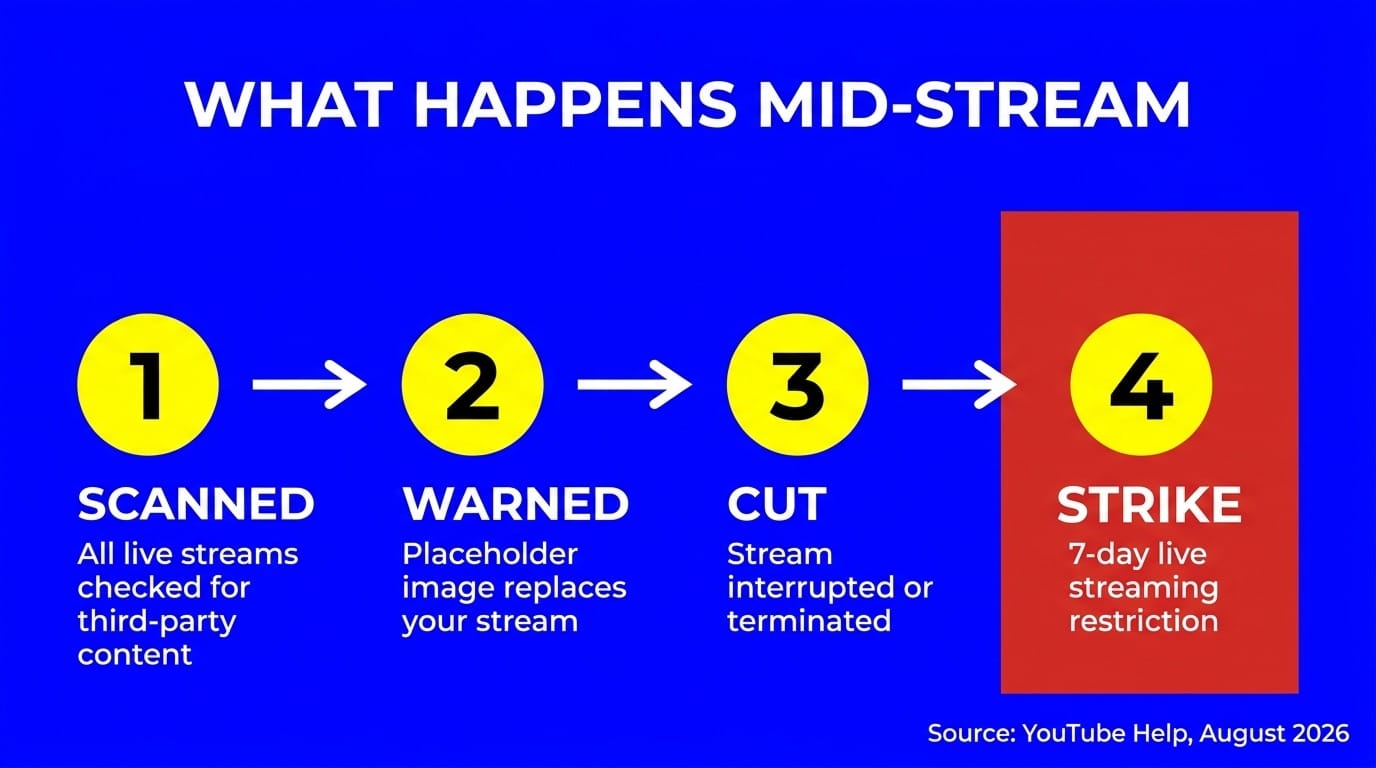
YouTube never publishes how fast step 1 happens. Anyone quoting a detection time in seconds is guessing.
Content ID claims work backwards on live streams
For uploads, a Content ID claim can land any time after you publish. For live streams, it works the other way around.
YouTube: "Content ID claims are only made after you complete your live streams, if you decide to archive the video."
So a live stream can be killed mid-broadcast without ever producing a claim you can see or dispute. And a claim can appear hours later, attached to the archive, long after the broadcast ended. If you don't archive, there is no claim to receive.
Three rules that make the restriction harder to manage
Seven days sounds survivable. Three separate rules turn it into something worse for a channel that is supposed to run continuously.
1. You cannot fail over to a backup channel
This is the rule that breaks the standard redundancy playbook, and almost nobody writes about it. From YouTube's live streaming restrictions page:
"If your account has been restricted from live streaming, you're prohibited from using another channel to live stream on YouTube. This restriction applies for as long as it remains active on your account. Violation of this restriction is considered circumvention under our Terms of Service and may result in termination of your account."
If your plan for a strike is "flip the feed to the backup channel," your plan converts a 7-day restriction into a termination risk.
This is worth checking against how you have set things up in normal operation. YouTube's general concurrency cap is "a limit of 10 active streams allowed per channel and 3 active streams per stream key," so running several streams on one channel is a supported setup. That is unrelated to the restriction rule above, and it does not survive one. A restriction stops the account from streaming, and reaching for a second channel is the thing YouTube calls circumvention.
2. YouTube's own docs contradict each other on the 90 days
YouTube's live streaming eligibility page says:
"To live stream, you need to have no live streaming restrictions in the past 90 days and you need to verify your channel."
The copyright strike page says 7 days. Both are YouTube pages. YouTube does not reconcile them anywhere, and we are not going to pretend to know which one the system enforces.
What we can say: the 7-day figure is the one YouTube states specifically for copyright strikes on live streams, while the 90-day figure sits in the general eligibility rules that govern whether a channel can stream at all. If you are still turning live streaming on for the first time, those baseline requirements are worth reading in full. Plan for 7 days off air. Do not assume 90 days is impossible.
The same 90-day wording shows up in YouTube's mobile live streaming requirements, alongside the 50-subscriber threshold: "No live streaming restrictions within the last 90 days on your channel."
3. Licensed music does not protect a live stream by itself
One line in YouTube's live copyright doc undoes a lot of assumptions:
"If your channel isn't added to their allowlist, your live stream can be interrupted even if you've licensed the third-party content."
Holding a licence is not the same as YouTube knowing you hold one. The rights holder has to allowlist your channel. For sourcing music that avoids the problem entirely, see our guide to playing music in a live stream without copyright issues, which covers licence types and safe libraries in detail. This post covers what happens after something goes wrong.
What 168 hours off air costs an always-on channel
Seven days is 168 continuous hours. For a 24/7 channel that is not a pause, it is a full stop.
- No stream means no watch time accruing toward the 4,000 public watch hours monetization threshold.
- The stream's URL, its search presence, and any traffic pointing at it all go dead for a week.
- Returning subscribers find nothing live. Recovery of concurrent viewers after a week off is not instant.
YouTube does not document what happens to your setup when the restriction lifts. Whether stream keys stay valid, whether the archived recording of the struck stream survives, and whether an interrupted 24/7 stream can be resumed rather than rebuilt are all undocumented. Assume you rebuild. Note also that YouTube caps stream creation per day: "If you've reached your daily limit for creating live streams, you can try again in 24 hours."
That is the practical argument for a setup you can restart in minutes rather than hours. With LiveReacting, a 24/7 channel is a playlist plus a schedule: upload video, go live in about 5 minutes, then leave it alone. Encoding is automatic and free, playlists and recurrence handle the schedule, and you can edit a running playlist while it is live. It will not stop a strike. It does shorten the rebuild.
Don't confuse this with a Community Guidelines strike
Most of the wrong numbers on this topic come from mixing the two systems. YouTube states it directly: "Copyright strikes are different from Community Guideline strikes and copyright claims."
A first Community Guidelines strike blocks you for 1 week from:
- Uploading videos or live streams
- Starting a scheduled live stream
- Scheduling a video to become public
- Creating a Premiere
- Custom thumbnails, posts, and playlists
It also freezes what you already scheduled: "Your scheduled public content is set to 'private' for the penalty period duration. You have to reschedule it when the freeze period ends."
A second CG strike within the same 90 days is 2 weeks. A third "may result in your channel being permanently removed from YouTube." Each strike "will not expire until 90 days from the time it was issued." A first violation is usually a warning rather than a strike.
Two things not to copy across:
- YouTube does not state that a copyright strike blocks uploads, custom thumbnails, or monetization. Those penalties are documented for Community Guidelines strikes.
- YouTube's own pages disagree here too. The live streaming eligibility page says "A strike will prevent you from live streaming for 14 days," on a page that never says which kind of strike it means, while the Community Guidelines strike page says the first strike is 1 week. Both are current YouTube documentation.
Also documented only for CG strikes: whether scheduled or upcoming streams get set to private. YouTube says nothing about that for copyright strikes.
How to clear a copyright strike
YouTube gives three routes:
| Route | What it involves | Timeline |
|---|---|---|
| Copyright School + wait | "Copyright School consists of 4 questions about how copyright works on YouTube." You only have to complete it once. | Strike expires in 90 days |
| Retraction | The claimant withdraws the request | Immediate on retraction |
| Counter notification | You assert the removal was wrong | Claimant then has 10 US business days. If they don't act, "your content will be reinstated to YouTube (unless you have deleted it)" |
Deleting the video is not a route. "In all other cases, deleting a video doesn't resolve a copyright strike."
There is one escape hatch, and it only exists before the strike lands. A claimant can schedule a removal request to take effect later: "You can schedule a copyright removal request to take effect in 7 days," which means "you have 7 days to delete your content and avoid the copyright strike."
For Content ID claims, which are not strikes, the timelines are different:
- Dispute a claim and the claimant has 30 days to respond. No response and "the claim on your video will expire and be released from your video."
- Appeal a rejected dispute and the claimant has 7 days. "Escalate to Appeal" is only available for claims that block your video.
- Revenue held during a dispute: dispute within 5 days and revenue is held from the claim's first day. Dispute later and it is held from the dispute date. Do nothing and held revenue goes to the claimant after 5 days.
- You can also remove a claim without disputing it: erase the song, trim out the segment, or replace the song.
One navigation note. The Copyright tab in YouTube Studio is now called Content detection. Any tutorial telling you to open a "Copyright" tab is out of date.
Linked channels are part of your exposure
One line worth checking against your own setup: "If a channel linked to yours has 3 active copyright strikes, your channel is also subject to termination."
If you run several channels under one brand account, they are not independent risk. Neither is termination survivable by starting over: "content uploaded to your channel will be inaccessible. You can't create new YouTube channels."
How Twitch and Facebook differ
Useful contrast if you multistream, and both work differently from YouTube.
Twitch: automated detection does not touch the live broadcast
Twitch's audio recognition scans recordings, not the live feed. Its Music Guidelines: "We may mute VODs and delete Clips where our audio recognition system detects copyrighted audio in them." A mute is not a strike: "The fact that one of your VODs was muted does not mean that you received a DMCA notification."
Two narrow exceptions can trigger an enforcement from a live stream: pre-release or unreleased recordings, and Twitch DJ Music Catalog tracks played on a channel not enrolled in the DJ Program. A rights holder can also get a broadcast killed manually, since Twitch "may disable a livestream and/or suspend an account if the claimed infringement is continuing at the time we receive the rights holder's notification."
Three strikes ends the account: a user "will be considered a repeat infringer if they accrue three copyright strikes." Twitch says strikes do expire but explicitly declines to publish a duration, so treat any specific number you read elsewhere as invented. Copyright School removes one strike, once every 12 months.
Facebook: the broadcast itself can be stopped
Meta is the most explicit of the three about stopping the broadcast itself. Its Live Video API doc says "your broadcast may be stopped if we detect copyright infringement."
You get a warning first: "If we detect that your live video broadcast includes music in a way that doesn't adhere to our music licensing agreements, you may receive a notification from us while filming." The documented ladder is on-screen warning, then mute or block, then the broadcast may be stopped.
Meta's Music Guidelines also single out music-listening formats: "if you use videos or other content on our Products to create a music listening experience for yourself or for others, your content may be blocked and your page, profile or group may be deleted. This includes live videos." Its Live guidance asks creators to keep total music duration to a minimum, which Meta puts at under 30 minutes, to have a visual component, and to hold rights holder approval. The same page says Facebook Live should not be used to broadcast looping videos, static images, or poll-only videos, which rules out the always-on formats that work on YouTube.
Meta publishes no strike count for copyright and no live-specific restriction duration. The 1-through-10 strike ladders you see quoted are Community Standards, not copyright.
Pre-flight checklist for always-on channels
Before you leave a channel running unattended:
- Verify every asset in the playlist is licensed or original. A 24/7 music channel is the highest-risk format there is.
- Confirm your channel is on the rights holder's allowlist if you are relying on a licence. A licence alone will not stop an interruption.
- Don't plan to fail over to a backup channel. Using one while restricted is circumvention.
- Decide in advance whether you archive live streams. Archiving is what exposes them to Content ID.
- Know where Content detection lives in Studio before you need it.
- Keep the source files and stream configuration somewhere you can rebuild from in one sitting.
- If you run multiple 24/7 streams, audit which ones share a channel and which share a brand account link.
FAQ
How long does a copyright strike stop you from live streaming? Seven days for the first strike, 14 days for a second, when the removed content was an active live stream. YouTube separately says eligibility requires "no live streaming restrictions in the past 90 days" and does not reconcile the two figures.
How long does a copyright strike last on YouTube? Ninety days, but only if you complete Copyright School and your channel has fewer than 3 copyright strikes. It does not expire automatically.
Can a live stream get a copyright strike? Yes. If your active live stream is removed for copyright, your channel gets a copyright strike.
Does a Content ID claim give you a copyright strike? No. Only a valid copyright removal request creates a strike. Claims do not accumulate into one, though disputing a claim without a valid reason can lead the owner to file a removal request that does.
Do Content ID claims happen during a live stream? No. "Content ID claims are only made after you complete your live streams, if you decide to archive the video." Live streams are still scanned in real time, which is a separate mechanism.
Can I use a second channel to keep streaming while restricted? No. YouTube calls it circumvention under its Terms of Service and says it "may result in termination of your account." The restriction follows the account, not the channel.
Does a copyright strike stop you from uploading or monetizing? YouTube does not state that anywhere in its copyright strike documentation. Upload and thumbnail restrictions are documented for Community Guidelines strikes, which are a different system.
How do you remove a copyright strike on YouTube? Complete Copyright School and wait out the 90 days, get the claimant to retract, or submit a valid counter notification. After a counter notification the claimant has 10 US business days to act before your content is reinstated.
The takeaway
YouTube documents a seven-day live streaming restriction for a first copyright strike, while its general eligibility wording leaves a 90-day ambiguity it never resolves. Plan around the seven days, keep the longer figure in mind, and build the channel so a week off is a rebuild you can do in an afternoon. The one rule to internalize now is that a backup channel is not a recovery plan, it is a termination risk.
If you want a 24/7 setup that restarts from a playlist instead of a rig, start with LiveReacting's 24/7 live stream channel, or read the step-by-step build guide first.
Transform Your Live Streams with LiveReacting
Join 10,000+ streamers who are boosting engagement and viewership by adding pre-recorded videos, games, polls, and countdowns to their streams.
Try LiveReacting for free today and take your streams to the next level!