
What Are YouTube Stations? How They Work in 2026
YouTube widened Stations past music in August 2026. Access is still invite-only, and most of what people claim about them is not documented anywhere.
A YouTube Station is a continuous, 24/7 stream built from videos a channel already has. YouTube curates them into a loop you drop into rather than pick from, with live chat running alongside.
On August 21, 2026, YouTube widened Stations past music artists to creator content, media channels and podcasts. What did not widen is access. It is still an invitation, and there is still no way to ask for one.
What changed in August 2026
YouTube announced the expansion in its "test features and experiments" help thread, not in a blog post. Here is the part that matters, quoted in full:
We're expanding Stations, a new destination to enjoy a continuous, 24/7 stream of curated videos, to include new formats like creator content, media channels, podcasts, and select new music artists.
And, two paragraphs later, the sentence most coverage skipped:
For creators, we are starting with a limited number of new creators for this experiment, and will keep you up to date when we expand.
Read those together and the shape is clear. More kinds of content are eligible. The number of creators who can run one is still small, and YouTube calls the whole thing an experiment.
Where Stations show up
YouTube is specific about this, and it is worth quoting because it is one of the few operational details published anywhere:
You can find Stations recommendations in your Home and Search feeds in the YouTube and YouTube Music apps on mobile, desktop, and TV devices.
Two things follow. Recommendations surface in Home and Search, so a Station can reach people who were not looking for the channel. And there is no dedicated Stations tab or hub, only placement inside feeds you already use.
The feature is live everywhere except three countries. In YouTube's words, it is "available to all users globally, with the exception of Portugal, Switzerland, and Turkiye."
How a YouTube Station works
A channel's existing videos play back to back as one always-on stream. Nothing is filmed live. Viewers arrive mid-programme, the way they would tuning into a TV channel.
YouTube confirms one behaviour directly, and it is the important one:
You can watch and engage in real-time with other fans in live chat, making it feel like a shared viewing room.
So live chat runs even though every video is pre-recorded. That is the mechanic that makes a Station feel live rather than feel like a playlist.
One naming trap worth knowing. YouTube Music has had "radio stations" for years, meaning personalised song mixes. That is a different feature with a similar name. Searching YouTube's help centre for "stations" returns the music one, not this one.
What YouTube has not said
This is where most articles start guessing. As of September 7, 2026, the community forum post above is the only YouTube documentation that exists. There is no help article, no creator guide and no setup instructions.
That leaves real questions unanswered:
- Monetization. Nothing published about ads, memberships or Super Chat on a Station.
- Watch hours. No statement on whether Station viewing counts toward the Partner Program.
- Archiving. No statement on whether a Station leaves a VOD behind.
- The Live tab. No statement on whether a Station appears there.
- Viewer controls. No statement on whether people can skip, rewind or seek.
- Scheduling and branding. No documented way to program a specific video at a specific time, and nothing published about overlays or custom graphics.
We had some of these listed as facts in an earlier version of this post. They were not. Tracing them back, the confident claims circulating about Station badges and disabled seeking come from vendor blogs quoting each other, with no YouTube source underneath. We would rather tell you the list is blank than repeat that.
Who can get a Station
Nobody has published a way in, YouTube included.
There is no application form, no eligibility checklist, no waitlist and no date for wider access. YouTube says only that it is "starting with a limited number of new creators." If you have not been contacted, there is currently nothing to do about it.
That is the practical difference between a Station and running an always-on channel yourself. One is a queue you cannot join. The other you can start this afternoon.
Stations compared with a channel you run yourself
The honest comparison is narrower than it used to be, because the music-only limit is gone. What is left is access, control and reach.
| YouTube Stations | A 24/7 channel you run | |
|---|---|---|
| Getting one | Invite-only experiment, no application published | Any channel, today |
| Content types | Creator, media, podcasts, select music artists | Any niche |
| Programming | No published way to schedule specific videos | Playlists, ordering, shuffle, recurring schedules |
| Changing it mid-stream | Not documented | Swap or reorder videos without stopping the stream |
| Branding | Nothing published | Logos, text, templates, white-label |
| Destinations | YouTube | YouTube, Twitch, Facebook, any RTMP, at once |
| Interactivity | Live chat | Live chat, plus comment-driven polls, trivia and giveaways |
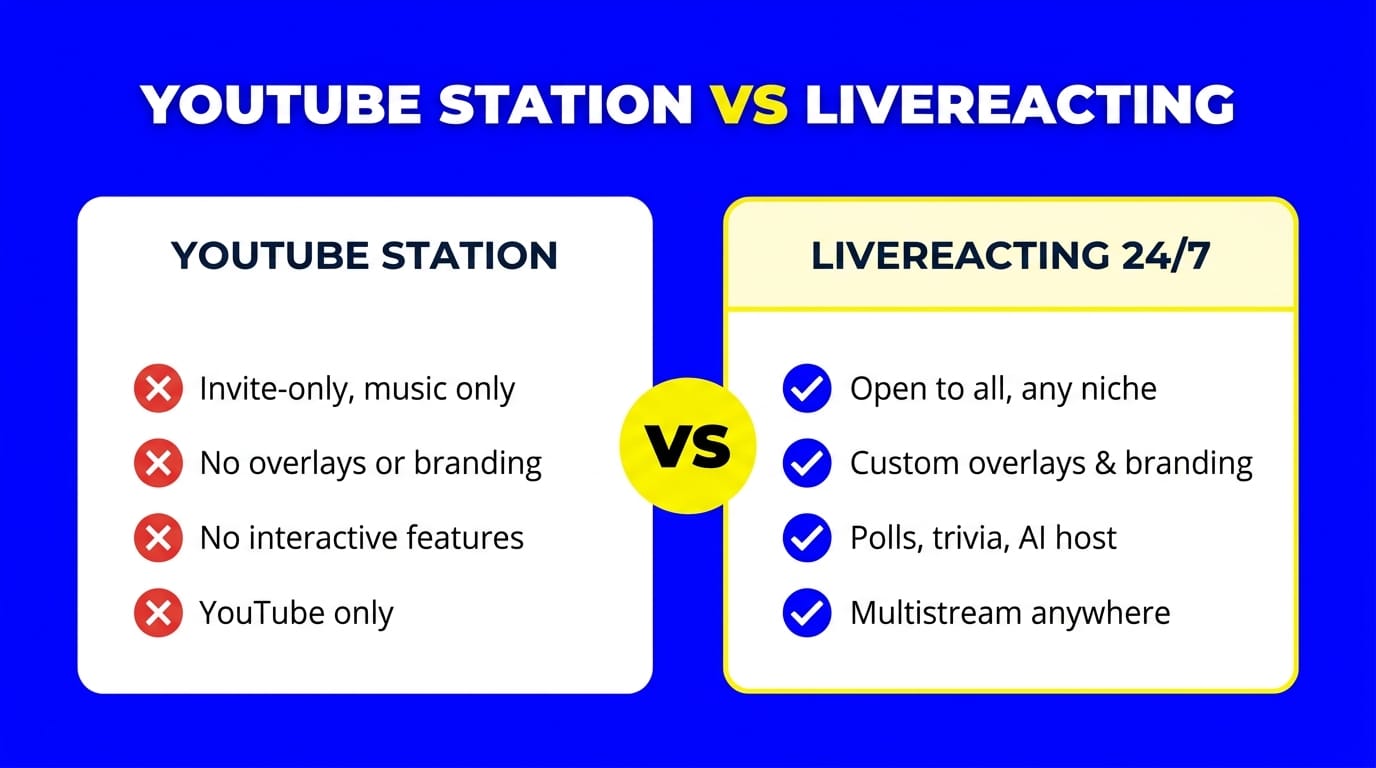
Note the wording in the middle rows. "Not documented" is not the same as "impossible." YouTube has published nothing about a creator-side interface, so nobody outside the test group knows what a Station operator can actually control.
How to build your own 24/7 YouTube channel today
You do not need an invite, OBS, or a computer left running. A cloud tool like LiveReacting does it: upload video, set it to loop, go live. Five minutes, then it runs on its own because the encoding happens on our servers rather than your machine.
- Get a few hours of video together. Enough that the loop is not obvious. If you need direction, here are 24/7 live stream ideas that work.
- Upload and build a playlist. Set the order, or shuffle it. You can import a long list from a spreadsheet rather than adding files one at a time.
- Connect your YouTube channel. Check live streaming is enabled on the account first.
- Go live and leave it. Your pre-recorded video streams as live, around the clock, with your computer off.
From there the operational features are what keep a channel running without you:
- Advanced scheduling. Run a stream on a repeating pattern, daily, weekly or on custom gaps, and it resumes where it left off.
- Editing while live. Swap a video, reorder the playlist or change a scene without taking the stream down.
- Automatic encoding. Files are processed for you, so a mixed bag of source formats still plays cleanly.
- Mixing live and pre-recorded. Drop a live camera or a web feed into a running playlist.
- Broadcast output. HLS and SRT, plus SCTE-35 ad markers on enterprise plans.
- Web pages as video. Stream a crypto chart, a dashboard or a scoreboard through the API, so the picture changes on its own instead of looping.
- Multistreaming. The same channel to YouTube, Twitch and Facebook at once, with chat from all of them in one place.
- Interactive overlays. Comment-driven polls, trivia and giveaways, if you want viewers doing something rather than watching.
One rule applies to any always-on channel, Station or not. Keep the content varied. YouTube's AI and repetitive content rules cover looped streams, and a 24/7 music channel built from ten minutes on repeat is the kind of thing they are aimed at.
FAQ
Are YouTube Stations available to everyone? Viewers, yes, everywhere except Portugal, Switzerland and Turkiye. Creators, no. YouTube says it is "starting with a limited number of new creators for this experiment" and publishes no application process.
Are YouTube Stations only for music? Not since August 21, 2026. YouTube expanded them to creator content, media channels, podcasts and select new music artists. The pilot began with a small group of music artists.
How do I apply for a YouTube Station? You cannot. There is no form, no waitlist and no published eligibility checklist, and YouTube has given no date for wider access.
Do YouTube Stations have live chat? Yes. YouTube describes watching and engaging "in real-time with other fans in live chat" even though the videos are pre-recorded.
Do Stations earn watch hours or ad revenue? YouTube has not said. Monetization, Partner Program watch hours and VOD archiving are all undocumented as of September 7, 2026.
Can I make a 24/7 YouTube channel without an invite? Yes. Cloud streaming tools loop a playlist into an always-on stream on any channel, with no invite and no computer left running.
Start your own 24/7 channel
Stations tell you where YouTube thinks viewing is going. Always-on, lean-back, chat alongside. The bit worth noticing is that YouTube is building it as a curated experiment while the same thing is available to anyone who wants to run it themselves.
Upload a video, set it to loop, and launch your own 24/7 live stream channel in minutes.
Sources
- YouTube Help, test features and experiments thread. The August 21, 2026 post by TeamYouTube. Every YouTube quote above, the country exclusions, and the creator-access wording. Checked September 7, 2026. This is the only YouTube-owned source on Stations that exists; there is no help article.
- YouTube blog, Coachella on YouTube. Coachella TV, the format's first outing.
Transform Your Live Streams with LiveReacting
Join 10,000+ streamers who are boosting engagement and viewership by adding pre-recorded videos, games, polls, and countdowns to their streams.
Try LiveReacting for free today and take your streams to the next level!