
What Is a FAST Channel? Cost, Setup, and How to Run One
A FAST channel is free ad-supported streaming TV on a linear schedule. What one costs to run, what you need, and how to launch your own always-on channel.
A FAST channel is a free, ad-supported streaming TV channel that plays scheduled programming around the clock, like a cable channel you never pay for. FAST stands for Free Ad-Supported Streaming Television. Pluto TV, Tubi, Samsung TV Plus, and The Roku Channel are the biggest names.
This guide covers what a FAST channel is, what one costs to run, what you actually need, and how to launch an always-on linear channel of your own on YouTube or to any RTMP destination.
What is a FAST channel?
A FAST channel is a single, always-on stream of curated video that anyone can watch for free. There's no subscription and no login. Ads pay for it, the same way broadcast TV always worked.
The "linear" part matters. You don't pick an episode from a menu. You tune in and watch whatever is scheduled right now. Miss the start of a movie and you catch it next time it loops. It's a lean-back experience, not an on-demand one.
That's the difference from Netflix or standard YouTube. Those are on-demand: you choose what plays. A FAST channel programs the content for you and runs it on a schedule, 24 hours a day.
eMarketer defines FAST as a category of streaming services delivering linear-style, scheduled programming at no cost to viewers, funded entirely by advertising.
One clarification worth making early, because most guides skip it. FAST is a distribution model, not just a video format. A channel carried on Roku or Pluto is a FAST channel. A 24/7 linear stream on your own YouTube channel uses the same programming model and the same tooling, but it isn't carried on a FAST platform. This guide calls that second thing FAST-style linear streaming, and it is the route almost every creator and brand actually takes.
How a FAST channel works
Every FAST channel runs on the same four parts:
- A content library. Movies, shows, clips, or any pre-recorded video the channel owner has rights to.
- A schedule (playlist). The library is arranged into a running order that loops, so something is always playing.
- A streaming pipeline. The schedule is encoded and pushed out as one continuous linear feed.
- Ad breaks. Commercials are inserted between or inside programs, which is how the channel earns.
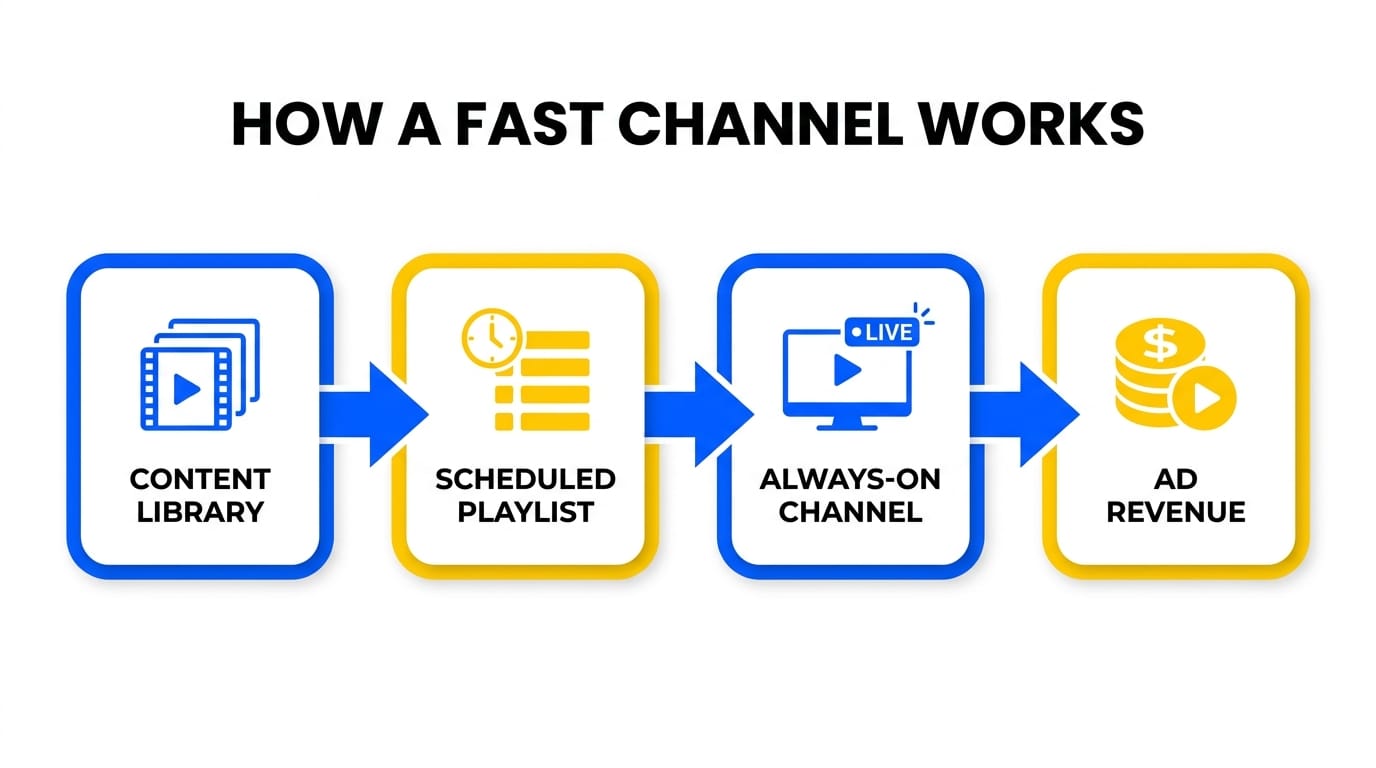
No one sits in a control room pressing play. The schedule runs itself, which is what lets one channel broadcast nonstop without a playout operator on shift.
Major FAST platforms
The Business Research Company forecasts the FAST market at about $14.88 billion in 2026, up from $12.28 billion in 2025 (press release). That is one firm's projection for a paid report, so treat it as a direction of travel rather than a hard number.
| Platform | Owner | Scale |
|---|---|---|
| The Roku Channel | Roku | 97.3m US viewers forecast for 2026 |
| Tubi | Fox | 92.5m US viewers forecast for 2026 |
| Pluto TV | Paramount | 68.6m US viewers forecast for 2026 |
| Samsung TV Plus | Samsung | Preinstalled on Samsung smart TVs |
| LG Channels | LG | 5,000+ channels across 37 countries |
The viewer figures are EMARKETER forecasts for 2026 and cover those three services only. The Samsung and LG entries describe distribution, not audience, so the table doesn't rank all five on one metric. EMARKETER's same forecast puts US FAST users at 131.4 million in 2026, or 54% of all connected-TV users.
The shelf is crowded. LG Channels alone passed 5,000 FAST channels across 37 countries in July 2026 (Advanced Television). None of the major platforms offers a self-serve signup for a new channel as far as we could find on August 15, 2026. Roku publishes a partner process for approved linear distribution providers; the others route you to a business-development contact or an aggregator. Assume a conversation, not a signup form.
FAST channel vs a traditional YouTube channel
A FAST channel and a normal YouTube channel are not the same thing. One is a scheduled linear feed, the other is a library of clickable videos.
| FAST channel | Traditional YouTube channel | |
|---|---|---|
| Format | One linear feed, always on | Library of individual videos |
| How viewers watch | Tune in, whatever is scheduled | Click a title, watch on demand |
| Scheduling | Programmed playlist, loops 24/7 | No schedule, viewer picks |
| Revenue | Ad breaks in the feed | Ads per video, memberships |
| Feel | Lean-back, like TV | Lean-forward, search and click |
You don't have to choose. YouTube supports always-on, TV-style channels too, which is where the two models meet. YouTube's own version is YouTube Stations, a playlist that loops as a 24/7 channel.
What a FAST channel costs to run
Prices below were checked against each source on August 15, 2026.
There are two routes, and they are priced for different businesses.
Route 1: FAST-style linear streaming on YouTube or any RTMP destination. You program a 24/7 channel and stream it to a channel you own. No carriage deal, no aggregator.
Route 2: get carried on a FAST platform like Roku, Tubi, or Pluto. This is a media business with a distribution deal attached, and the tooling is priced for broadcasters.
Here is what route 1 costs, line by line, using LiveReacting's 24/7 plan as the reference:
| Line item | Cost |
|---|---|
| Cloud playout, one always-on 1080p channel | $39.99/mo standard. A current coupon takes year one to $23.99/mo, billed $287.88, then renewing at the standard $396/year |
| Video encoding | Included |
| Storage | 100 GB included, then $7/mo per additional 100 GB |
| Delivery to viewers | $0 on YouTube and any platform that hosts the playback. You pay only if you deliver from your own CDN |
| Playout operator | $0. Nobody runs the schedule on shift |
| Programming and monitoring | Your time. Budget a few hours a month, more if the library changes often |
| 4K or 60fps | 2x and 1.5x the base price respectively |
| Content | Whatever your rights cost. $0 if you own your library |
If you own your content, a single always-on channel runs about $40/month in software. Several channels are cheaper per channel: at four or more streams the list rate flattens to $23.71 per stream per month. Details in our guide to running multiple 24/7 live streams, and the full plan breakdown is on the pricing page.
Route 2 costs more, and the pricing is structured differently. FAST Channels TV publishes two models, announced in May 2025 (Advanced Television):
- Revenue share. $250/month for standard playout, but as a minimum guarantee against their share, with revenue split 35% content owner, 35% OTT platform, 30% FAST Channels TV. SSAI, ad server, ad ops and CDN are included. Advanced playout is $750/month.
- Technology licence. $250/month for the first output URL, $150/month for each additional one, no revenue share. You supply SSAI, ad server and CDN yourself.
Veset's own FAST channel playout page headlines $499 per month. Most enterprise playout vendors publish no price at all and route you to a sales call.
Read those two models carefully, because the headline number is the same and what you get is not. Under revenue share you are giving up 30% of the channel's income, and $250 is the floor rather than the price. Under the licence you are buying playout only, and the ad stack and CDN are still on your bill.
Neither model gets you distribution. That still needs a deal with the platform or an aggregator taking a share.
How an always-on channel earns
This is where most guides get it wrong, including some of ours, so here is the mechanic as YouTube documents it.
Ad revenue on YouTube starts at the YouTube Partner Program. As of August 15, 2026 the threshold is 1,000 subscribers plus either 4,000 qualified watch hours in the last 12 months, or 10 million qualified Shorts views in the last 90 days. Check the current numbers before you plan around them, because YouTube has moved this bar before.
The catch is what counts. YouTube's eligibility page lists the video types whose watch hours "don't count towards YPP thresholds", and that list includes "Livestreams that are unlisted, deleted, or not converted to VOD (video on demand)" (YouTube Help).
A separate YouTube page sets the archiving limit: "If your live stream is less than 12 hours, YouTube can automatically archive it for you", followed by the warning "If your stream exceeds 12 hours, it may not be captured at all" (YouTube Help).
Put those together and a stream that literally never stops is the worst possible shape for getting into YPP. It never ends, so it never converts to VOD, so its hours don't count. Run it past 12 hours and YouTube may not archive it at all.
The way around it is scheduling, not luck:
- Run the channel as recurring blocks under 12 hours that end and archive as public VOD, rather than one infinite stream. Recurrence in your scheduling tool restarts the next block automatically, so the channel still reads as always-on to a viewer.
- Keep the archives public. Unlisted and deleted streams are excluded by the same rule.
- Once you are already in YPP, the calculus changes. Ads serve against the live feed, so an uninterrupted stream is fine after you are in. The 12-hour shape matters most on the way there.
Our YouTube monetization requirements checklist covers the rest of the eligibility gate, and how much a 24/7 live stream can earn covers the numbers on the other side of it.
Two more things shape the revenue once you're monetized:
- Ad slots. The 24/7 plan lets you place ad slots in the running order, so breaks land between programs instead of mid-scene. A slot marks where a break can happen. Whether a given viewer gets an ad, and which ad, is YouTube's call.
- Ad load. Frequency moves revenue and retention in opposite directions. More breaks means more opportunities and fewer viewers left to serve them to. Long non-skippable breaks lose a lean-back audience fastest.
Back catalog is the input to all of it. Content that would otherwise sit idle gets a second life on a schedule. See how to repurpose a whole YouTube channel into a 24/7 stream and our guide to 24/7 YouTube channels as linear TV.
Server-side ad insertion, HLS and SRT output are available on LiveReacting's Custom plan for broadcast-grade distribution. That's a sales conversation, not a self-serve upgrade, and on YouTube the platform enables dynamic ad insertion channel by channel.
What you actually need to run a FAST channel
Six things, and none of them is a building full of equipment.
- Rights to everything you play. Non-negotiable on YouTube and on every FAST platform. This is the requirement that stops most channels, not the technology.
- Enough content that the loop isn't obvious. A few hours is enough to launch. Twelve to twenty-four hours means an evening viewer never sees the same thing twice in one session. Longer is practical: LiveReacting playlists have been load-tested at 31 scenes and 110 files with ad slots in a single channel, which is weeks of unique programming.
- Consistent encoding. A library with mixed resolutions, framerates and aspect ratios produces visible jumps and letterboxing at every switch. Normalize before you upload, or use a tool that encodes for you.
- Cloud playout, not a machine under your desk. A 24/7 channel is a 24/7 uptime commitment. Running it from your own computer makes every reboot, update and internet blip a broadcast failure. You can launch a 24/7 stream without OBS or any local software.
- A real schedule, not just a loop. Playlists that run in order, shuffle or loop, plus recurrence so blocks restart on their own. As above, recurrence is also what makes the YPP archiving rule work in your favour.
- A destination. A YouTube channel you control, or an RTMP ingest from whoever is carrying you. The 24/7 plan includes 5 destinations with RTMP output to any endpoint.
What you don't need for route 1: a playout server, a control room, an operator on shift, new footage, or a distribution deal.
How to start your own always-on channel
LiveReacting runs this from the browser. Upload video, build a playlist, go live in about five minutes. It streams from the cloud, so nothing stays on at your desk.
- Build your library. Get a few hours of video ready so the loop isn't obvious. Ideas in our list of evergreen 24/7 live stream ideas.
- Upload and let it encode. Encoding is handled for you, which is what keeps a mixed library from looking mixed on air.
- Arrange the playlist. Drop your videos into a running order, like a TV schedule.
- Set the recurrence. If you're not yet in YPP, schedule blocks under 12 hours that end and archive, then repeat. If you are already monetized, run it continuously.
- Place your ad slots. Mark where breaks go in the running order rather than leaving them mid-scene.
- Connect your destination and go live. Link YouTube, or push to any RTMP endpoint including a FAST platform's ingest. The cloud loops your pre-recorded video as live, 24/7.
The full walkthrough is in our 24/7 YouTube channel guide, and the scheduling layer specifically is in how to stream a video playlist.
What running an always-on channel actually involves
The setup is the easy part. Here is what a channel looks like once it's been running for a few months.
- One bad file can stall the whole channel. A corrupted upload in the middle of a loop takes the channel down if nothing catches it. Whatever you run on has to detect the bad file and skip to the next one instead of sitting on it.
- Streams drop, and the recovery matters more than the uptime number. Network degradation between the playout server and the platform is normal. What you want is automatic migration to another server and an automatic restart, not an alert at 3am.
- Changing content shouldn't mean restarting. Stopping the stream resets the live viewer count and the momentum on the video. Editing the playlist while the stream runs keeps the channel up, and the LiveReacting API can add new videos to a running channel.
- Repetition is a monetization-review risk. YouTube's monetization policies target content that is repetitive or minimally varied across a channel. A short loop running forever is the shape reviewers look at hardest. Vary the running order and mix in live or dynamic elements. Details in our guide to YouTube's AI content crackdown.
- Licensed content needs playback logs. If you're paying rights holders, you need a record of which file played and when. Per-file playback analytics on 24/7 playlists exists for exactly that.
- Interactive overlays are the last mile, not the first. Polls, trivia and countdowns give a passive loop something to react to. Useful, but only after the channel reliably stays up.
FAQ
What does FAST stand for? Free Ad-Supported Streaming Television. It's free to watch, funded by ads, and streamed as scheduled linear channels rather than on-demand titles.
What are examples of FAST channels? The Roku Channel, Tubi, Pluto TV, Samsung TV Plus, and LG Channels are the best-known FAST services. Each hosts hundreds or thousands of individual channels by genre and brand.
Is a FAST channel the same as a YouTube channel? No. A FAST channel is one always-on linear feed you tune into, carried on a FAST platform. A traditional YouTube channel is a library of videos you click and watch on demand. YouTube can host an always-on linear stream too, which is the closest self-serve equivalent, but it isn't FAST distribution.
How much does it cost to run an always-on channel? Running FAST-style linear streaming on YouTube or another RTMP destination costs about $40/month in software. LiveReacting's 24/7 plan is $39.99/mo standard, with a current coupon taking year one to $23.99/mo before it renews at the standard rate. Managed playout for a real FAST platform starts at $250/month per channel, and that figure is either a minimum guarantee against a 30% revenue share or a licence that excludes the ad stack and CDN.
How much content do I need to start? A few hours is enough to launch. Twelve to twenty-four hours is where the loop stops being obvious to anyone watching for a whole evening.
Do 24/7 live stream hours count toward YouTube monetization? Only if the stream converts to a public VOD. YouTube excludes livestreams that are unlisted, deleted, or not converted to VOD from qualified watch hours, and streams over 12 hours may not be archived at all. Run scheduled blocks under 12 hours that end and archive if YPP eligibility is the goal.
Do I need a distribution deal to run a FAST channel? To be carried on Roku, Tubi, Pluto or Samsung TV Plus, yes, usually through an aggregator or an approved distribution partner. To run the same linear format on a YouTube channel you own, no.
Start your own always-on channel
You can run the linear model yourself for around $40 a month, without a broadcast team or a platform invite. Upload your videos, build a playlist, set the recurrence, and launch a 24/7 live stream channel.
Transform Your Live Streams with LiveReacting
Join 10,000+ streamers who are boosting engagement and viewership by adding pre-recorded videos, games, polls, and countdowns to their streams.
Try LiveReacting for free today and take your streams to the next level!