
Best 24/7 Live Streaming Software in 2026 (Honest Comparison)
A criteria-led comparison of eight 24/7 live streaming tools: what an always-on channel really costs, which tools cap duration, and which can do more than loop.
Most comparisons of 24/7 streaming software rank tools on price and uptime. Those still matter. But in July 2026 YouTube rewrote its monetization policy on inauthentic content into named sections, alongside the existing reused-content rule, and one of them is "Generic or Repetitive Content."
Nothing in that update targets live or 24/7 streams. The rules did not change. What changed is that YouTube now names the thing it has been discouraging since November 2025, in plain language, on its own policy page. If your channel's entire output is one file looping forever, the vocabulary now used to describe unmonetizable content describes your channel too.
That's worth one extra evaluation criterion when you pick a tool: can it produce a stream that varies?
Here's how the main options compare.
How we compared these tools, and who wrote this
Disclosure: LiveReacting publishes this comparison and sells one of the seven products in it. That's a reason to check our work, so here's what it rests on.
Seven cloud 24/7 streaming services are included: LiveReacting, Upstream, Gyre, OneStream Live, Castr, Restream and StreamYard. Prices, plan limits and capabilities were verified against each vendor's own pricing and documentation pages on August 15, 2026, in a browser rather than by fetching the HTML, because several of these pricing pages render client-side and read wrong otherwise.
Every price assumes one 1080p 30fps stream running continuously, roughly 730 hours a month, unless a different stream count is stated. Where monthly and annual billing differ, both are given.
Two definitions that carry weight later:
- "Output protocol" means egress from the 24/7 service to an external destination you control. It does not include HLS a vendor uses internally to feed its own embedded player. Several tools here do the latter without offering the former.
- "Interactive overlays" means audience-triggered elements, where a viewer's comment or vote changes what's on screen. Branded graphics, alerts and stream designers are a different thing, and several tools have those.
Where a vendor's documentation is silent on a capability, this article says we found no documentation of it rather than asserting the tool cannot do it. Vendors are welcome to send a correction with a link to a public page and we'll update the article and the verification date.
What actually separates 24/7 streaming tools
Six things, roughly in order of how often they turn into a problem.
- True unlimited duration. "24/7" is marketed loosely. Some tools cap a continuous stream at 30 days, some cap loop counts, some cap total hours. Check the number, not the label.
- Programming depth. A playlist that plays in order is the floor. Scheduling, reruns, mixed sources and editing while the stream runs are what let a channel look programmed instead of looped.
- Whether the stream can vary. Overlays, polls, trivia, countdowns and chat on screen change what viewers see minute to minute. A loop cannot.
- Concurrency and destinations. One channel or ten, and how many platforms each stream reaches.
- Output protocol. Nearly every tool here pushes RTMP and stops. If you need SRT for a reliable long-haul contribution feed, HLS for a player or an OTT platform, or SCTE-35 markers so a server-side ad system knows where the breaks are, most of this category cannot do it at any price.
- Storage and encoding. Long playlists need real storage, and whether the tool encodes your uploads for you decides how much work you do per file.
Price sits underneath all of these. The cheapest tool is a bargain only if it clears the first criterion.
One thing worth separating before you read the rest: feature depth and setup difficulty are different axes. People assume the tool with more capability is the harder one to run. In this category that mostly isn't true, because every option here is cloud software with the same basic flow of upload, arrange, connect a destination, go live. Judge setup on that flow, not on the length of the feature list.
The tools
LiveReacting
Setup is upload your videos, arrange the playlist, connect the destination, go live. Same four steps as the simplest looping tool in this list, and you're done in about five minutes. Everything below is available on top of that, not in front of it. Nothing here is required to get a channel running.
The 24/7 plan runs unlimited duration at 1080p with one concurrent stream, 100 GB storage and five destinations, with RTMP out to any endpoint.
Standard price is $39.99/mo, or $396/year. A Kickstart promotion takes a new account to $21.99/mo on monthly billing or $23.99/mo on annual billing (billed $287.88 for year one, then $396/year). Four or more concurrent streams get a 23% volume discount on top, which matters below.
Programming. Playlists with shuffle, sorting, drag-and-drop reordering and CSV import, so a month of content takes minutes to load rather than an afternoon. Advanced scheduling with daily, weekly or custom recurrence. Editing while live, so you can swap or reorder videos without stopping the broadcast. Free automatic encoding of uploads to the right format, which Upstream, Restream and OneStream Live don't document. You can also mix sources inside one stream, combining a pre-recorded playlist with a live camera or a live web feed. It runs as a browser source inside OBS, VMix, StreamYard and Ecamm Live if you already have a workflow you like.
Interactive overlays on a continuous stream. Of the seven tools compared, LiveReacting is the only one documenting audience-triggered overlays on a 24/7 stream: trivia, polls, giveaways, countdowns, word games and on-screen chat. An always-on channel can generate comments rather than playing to silence. This is also the criterion that matters most for YouTube monetization, for the reason set out below.
Broadcast and enterprise output. On the Custom Plan, LiveReacting streams to external HLS destinations and SRT destinations as well as RTMP, and supports YouTube server-side ad insertion with in-band SCTE-35 ad markers. We found no public documentation of SCTE-35 support from any other tool in this comparison, at any tier, as of August 15, 2026. That plan also covers API access, custom limits and dedicated support, and streams run on dedicated infrastructure with multi-cloud failover and automatic restart. For an enterprise YouTube channel that needs ad breaks cued in the stream itself rather than placeholder videos, it's the only documented option among the seven.
You can also connect a YouTube destination through the YouTube API and bind to a scheduled broadcast instead of pasting a stream key. Upstream and Gyre do this too.
Weak spots, honestly: the base 24/7 plan is one concurrent stream, so several channels cost more, and HLS, SRT and SCTE-35 sit on the Custom Plan rather than in self-serve checkout. Upstream is the closer competitor on programming than most comparisons admit, and it matches LiveReacting on live editing and on mixing live with pre-recorded sources.
Best for: channels that want to be watched and talked in, not just left on. And any channel with broadcast-grade delivery or ad-insertion requirements.
Upstream
The most active competitor in this space right now. $30/mo for one stream, dropping to $50 for two, $70 for three, and $20 per stream at four or more. Annual billing takes the single stream to $24/mo. The free plan gives you 24 hours of streaming per month, and Upstream states that free and paid plans share the same feature set.
Multistreaming reaches up to 10 destinations across 30+ supported platforms, and it holds YouTube Verified Encoder status. You connect your YouTube account by API rather than pasting a stream key. Its June 2026 update added a playout engine, a public REST API and team roles, pushing it toward agencies and labels.
Programming is stronger than most comparisons give it credit for. Looping playlists with shuffle, daily and weekly repeats, real-time control that applies playlist changes without restarting the stream, and a Live Studio that mixes pre-recorded video with a webcam or OBS feed. On those axes it's the closest thing to LiveReacting in this list.
Where it stops: output is RTMP only, with no SRT or HLS delivery and no SCTE-35 ad markers, so a broadcast-grade workflow isn't in scope. No audience-triggered overlays, and no documented automatic encoding of uploads.
Best for: teams that want programmed playout and self-serve API control, and don't need the stream to be interactive.
Gyre
Three tiers: Start at $49/mo (one HD stream, 35 GB), Start+ at $99/mo (four HD or one 4K, 75 GB), and PRO+ at $169/mo (eight HD or two 4K, 150 GB). Longer commitments cut 7 to 17 percent. Multistreaming covers YouTube, Twitch, Facebook, Instagram, X, Kick and MixCloud.
Read the $49 tier carefully before buying it. Start includes neither playlists nor the stream scheduler. Both arrive at Start+, which is $99. So the entry plan streams one thing continuously and that's the extent of it. Gyre's 7-day free trial does include playlists and scheduling, but adds a watermark, which means the trial isn't showing you what $49 actually buys.
No interactive overlays documented, and output is RTMP only. Its YouTube API integration is a real advantage if you want tighter control of the broadcast object itself.
Best for: operators who value the YouTube integration and can budget for the $99 tier.
OneStream Live
Two things to check here, and neither is obvious from the plan names.
First, 24/7 streaming is not included on Free, Basic ($15/mo), Standard ($39/mo) or Professional ($49/mo). All four say "No 24/7 Stream." It arrives on Enterprise at $99/mo, or you can bolt it onto a lower plan for $30/mo per concurrent stream, $60 for two, $90 for three.
Second, and this is the one that catches people: OneStream's own tooltip states that "Each 24/7 stream runs for 30 consecutive days (Available for YouTube only)." So it's a 30-day run rather than a permanent channel, and it's YouTube-only. If you wanted an always-on channel on Twitch or Facebook, this isn't the tool.
OneStream announced an AI avatar called Onelia in November 2025, but it appears on no product surface: not the homepage, not the studio feature list, not the pricing matrix, not the helpdesk. Treat it as a marketing persona rather than a feature you can buy.
Best for: 30-day YouTube campaigns rather than permanent channels.
Castr
Castr gets recommended as the budget 24/7 option constantly, and the entry price does look like that: Starter $19.99/mo ($16.67 annual), then Standard $49.99, Premium $199.99, Ultra $349.99.
Read the playout page before you buy on that number. Castr's own TV playout documentation says "Loop mode is included on Premium plans and higher." Starter and Standard get Schedule mode only, which plays a timetable and then stops: "A playout ends when its last item plays or the loop reaches its end date." So the $19.99 plan doesn't run a channel indefinitely. It runs a schedule until the schedule is over.
Starter is thinner than the price suggests in three more ways. Files per playout start at 5. Output is 720p at 30fps, since 1080p is Ultra and Events only. And the channel carries a Castr watermark on trial, Starter and Standard.
Even Loop mode isn't unbounded: Premium loops up to 15 days ahead, Ultra and Events up to 30. Longer runs go through their sales team.
No interactive layer either. What you're paying for is playout.
Best for: broadcasters and FAST-channel teams at the Premium tier and up. Not the cheap always-on shortcut it's reputed to be.
Restream
Worth understanding before you buy, because 24/7 isn't what Restream is. Multistreaming is the core product: Standard $19/mo for 3 channels, Professional $49/mo for 5, Business $239/mo for 8, plus a free tier with 2.
Pre-recorded streaming is a separate Upload and Stream product with three tiers. Premier at $39/mo gives a 2-hour upload library at 1080p with scheduling but no playlists and no looping. Marathon at $79/mo raises the library to 4 hours and adds both. Media at $239/mo goes to 12 hours and 4K. That's on top of whatever multistreaming plan you're already paying for.
There's also a hard ceiling that settles the question. Restream's own help centre article on looping states: "You can loop your video up to 10 times" and "You can stream a maximum of a 40-hour stream with looping." Forty hours is a long broadcast. It is not a 24/7 channel, and no tier changes that.
Best for: multistreaming first, with occasional pre-recorded broadcasts second.
Also worth knowing
StreamYard caps pre-recorded at 8 hours and has no 24/7 mode. YoloCast comes from hardware maker YoloLiv and has moved into cloud 24/7. StreamPush serves music labels including Sony and Warner but is enterprise-only, not self-service. live247.io is the least stable of the group in our testing.
Can a 24/7 loop get demonetized on YouTube?
Not for being 24/7. Always-on and pre-recorded-as-live streams are allowed, and nothing in YouTube's policy targets continuous streaming. The exposure is narrower and it's about variation.
Two facts set it up, both from YouTube's own channel monetization policies page.
First, the policy covers live. YouTube states plainly: "Keep in mind that when we use the term video on this page, it refers to Shorts, long-form videos, and live streaming." A 24/7 stream is inside the scope of this policy, not outside it.
Second, "Generic or Repetitive Content" is now its own named section. YouTube defines it as content that "looks like it's made with a template, or that may feel repetitive to viewers after watching several videos in a row from the same channel," and says channels "where content feels interchangeable from video to video are not allowed to monetize."
Nothing there bans loops. Enforcement is channel-level and judgment-based, and YouTube explicitly allows automation and templates as long as the output "must still demonstrate your creative vision and provide educational or entertainment value." But a stream that plays the same files in the same order with nothing on screen changing is a close description of what that policy section is written about, and the policy covers live streams.
That's what makes criterion three a monetization question rather than a nice-to-have. A stream carrying a live poll, a trivia round, a countdown, a leaderboard or on-screen chat is not interchangeable minute to minute. It also collects comments, which is the engagement signal that pushes an always-on channel up in recommendations in the first place.
In this comparison, that's a one-tool answer. Of the seven tools compared, LiveReacting is the only one documenting audience-triggered interactive overlays on a continuous stream, checked against each vendor's own feature and pricing pages on August 15, 2026. We found no equivalent on Upstream, Gyre, OneStream Live, Castr, Restream or StreamYard. Upstream and Castr do offer branded graphics and stream designers, which is presentation rather than audience interaction.
To be exact about what this does and doesn't buy you: interactive overlays do not make a stream policy-compliant, and no tool can promise that. Monetization decisions are YouTube's, they're made channel by channel, and they weigh the whole channel. What overlays change is the underlying fact the policy is written about, which is whether the content varies.
For the longer version, see what YouTube's AI content crackdown means for 24/7 streamers.
Comparison table
All prices, limits and capabilities below were checked against each vendor's own pricing and documentation pages on August 15, 2026. Streaming tools reprice often, so verify before you buy.
Price and duration
Assumptions: one 1080p 30fps stream running continuously, about 730 hours a month. Verified August 15, 2026.
| Tool | Entry price | Price for a genuine always-on channel | Duration ceiling |
|---|---|---|---|
| LiveReacting | $21.99/mo (promo) | $21.99/mo promo, $39.99/mo standard | Unlimited |
| Upstream | Free (24h/mo) | $30/mo, $24/mo annual | Unlimited |
| Castr | $19.99/mo | $199.99/mo (Loop mode is Premium+) | 15 days Premium, 30 Ultra |
| Restream | $19/mo | $79/mo add-on, plus a base plan | 40 hours, 10 loops |
| Gyre | $49/mo | $99/mo (playlists start there) | Unlimited |
| OneStream Live | Free | $99/mo, or $30/mo add-on | 30 days, YouTube only |
| StreamYard | Varies | Not offered | 8-hour pre-recorded cap |
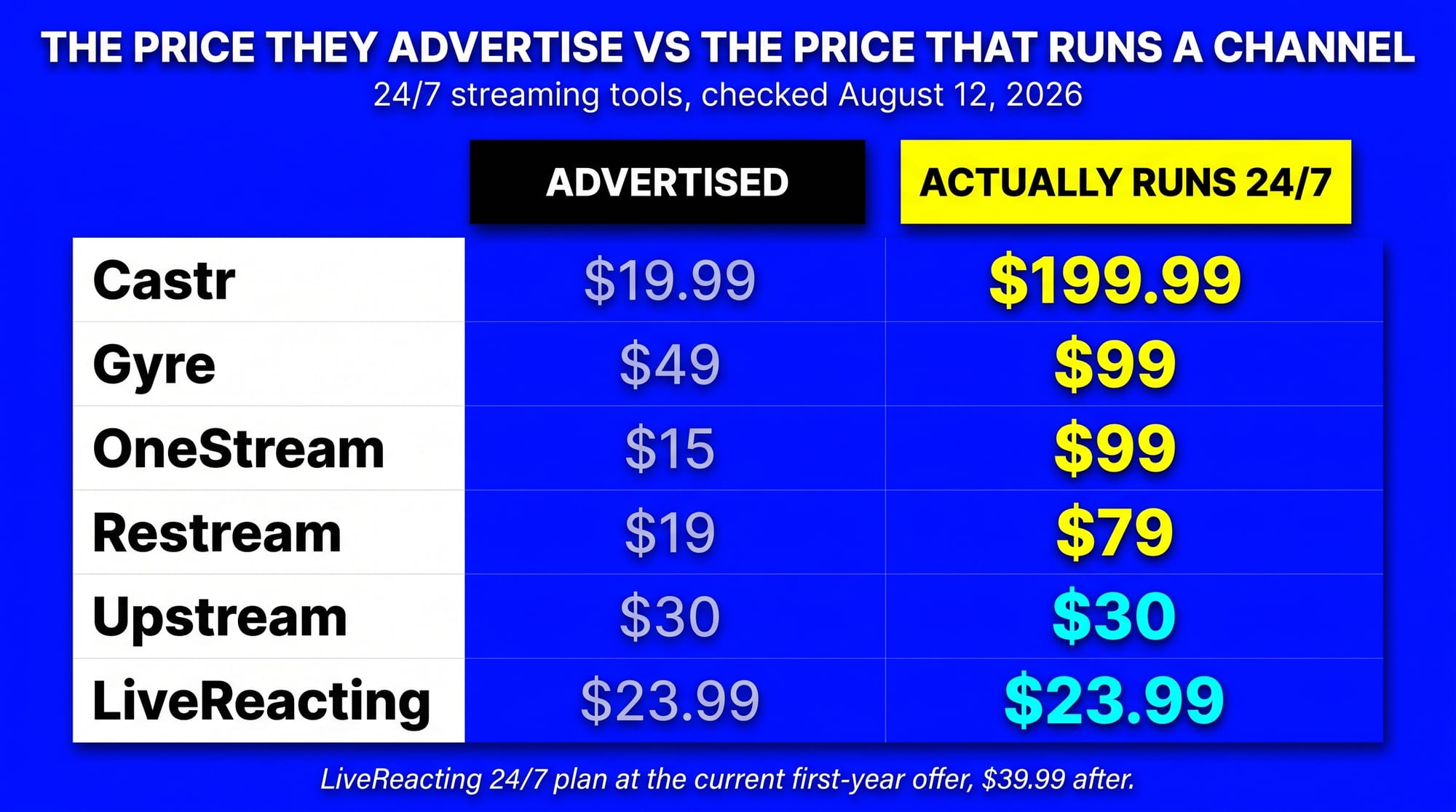
Read the middle column, not the first. Four of the seven advertise an entry price on a plan that cannot run a channel indefinitely, and three cap a continuous stream outright: Restream at 40 hours, OneStream Live at 30 days and YouTube only, Castr at 15 or 30 days depending on tier.
Core 24/7 features
These are the things that decide whether a channel runs itself. "None documented" means we found no public vendor documentation of it on August 15, 2026, not that the capability is impossible.
| Tool | Playlists | Scheduling and recurrence | Automatic encoding of uploads | Edit while live |
|---|---|---|---|---|
| LiveReacting | Yes — shuffle, sorting, drag reorder, CSV import | Yes, daily, weekly or custom | Yes, free | Yes |
| Upstream | Yes, with shuffle | Yes, daily or weekly | None documented | Yes |
| Castr | Yes, 5 files on Starter | Yes, all tiers | None documented | None documented |
| Restream | Marathon tier and up only | Yes | None documented | None documented |
| Gyre | Start+ ($99) and up only | Start+ ($99) and up only | Yes, Gyre Video Converter | None documented |
| OneStream Live | Yes | Yes | None documented | None documented |
| StreamYard | Not applicable | Yes | None documented | None documented |
Two traps here. Gyre's $49 tier has neither playlists nor the scheduler, and Restream's $39 Premier tier has no playlists either. Both are the plan most people land on.
Advanced and broadcast features
"Output protocols" means egress to an external destination you control, not HLS a vendor uses internally for its own embedded player. "Interactive overlays" means audience-triggered elements, where a viewer's comment or vote changes what's on screen.
| Tool | Output protocols | SCTE-35 ad markers | Mix live and pre-recorded in one stream | Interactive overlays |
|---|---|---|---|---|
| LiveReacting | RTMP, HLS, SRT | Yes, Custom Plan | Yes | Yes — trivia, polls, giveaways, countdowns, word games, on-screen chat |
| Upstream | RTMP | None documented | Yes, via Live Studio | None documented, branded graphics only |
| Castr | RTMP, HLS, SRT | None documented, VAST tag only | None documented | None documented, stream designer only |
| Restream | RTMP | None documented | None documented for 24/7 playout | None documented |
| Gyre | RTMP | None documented | None documented | None documented |
| OneStream Live | RTMP | None documented | None documented | None documented |
| StreamYard | RTMP | None documented | None documented | Basic giveaways |
Two findings carry the rest of this article. Of the seven tools compared, LiveReacting is the only one documenting SCTE-35 ad markers, and it's one of only two, with Castr, offering external HLS and SRT output alongside RTMP. And it's the only one with audience-triggered interactive overlays on a continuous stream.
Where LiveReacting is not the best choice
Three cases, stated plainly, because the verdicts below are worth less without them.
The stream isn't business-critical and you just want it cheap. If an occasional drop-out or a few hours of dead air costs you nothing, you don't need what LiveReacting spends its money on. Dedicated infrastructure, multi-cloud failover and automatic restart exist because a channel going dark on a customer's brand is a real problem, and that engineering is inside the price. For a hobby loop where nobody notices a gap, cheaper options are a rational choice. Where LiveReacting earns the difference is the opposite case: an always-on channel you can't afford to have fall over.
You want to run your own playout software on your own server. LiveReacting is cloud software. If your requirement is a stack you host on a VPS, configure yourself and control end to end, this whole category is the wrong shelf and you want self-hosted playout software instead.
You want broadcast playout with a published EPG. Castr exposes a program guide over its API on Premium and above. LiveReacting has no EPG endpoint.
Which one to pick
Cheapest 24/7 streaming software
LiveReacting, at $21.99/mo on monthly billing or $23.99/mo on annual under its Kickstart promotion. Both undercut Upstream's $30/mo monthly and $24/mo annual, and Upstream is the next-cheapest tool that genuinely runs a channel indefinitely. Price the renewal too: LiveReacting's standard rate is $39.99/mo, above Upstream's.
Lower headline prices in this category are mostly illusions. Castr's $19.99 tier has no Loop mode, so the channel ends when the schedule does. Restream's $19 plan isn't a 24/7 product at all. OneStream Live's lower tiers carry no 24/7 streaming.
Best for running several 24/7 channels at once
LiveReacting, on price and on capability. Four or more concurrent streams trigger a 23% volume discount, and under the Kickstart promotion that lands at $16.93 per stream on monthly billing and $18.47 per stream on annual. Upstream is $20 per stream monthly at four or more, and Gyre works out to $21.13 per stream on its eight-stream PRO+ tier. So the cheapest per-stream option here is also the only one that can run polls, trivia and on-screen chat on every channel, and the only one that can deliver over HLS or SRT.
One caveat worth having. Those are promotional rates. LiveReacting's standard rate at four or more streams is $23.71 per stream, above Upstream's $20, and Upstream's annual rate at that volume is lower still. If you're buying several channels for the long run, price the renewal as well as the promotion.
Best for enterprise and broadcast-grade 24/7 streaming
LiveReacting, and in this comparison there is no second option.
Of the seven tools compared, LiveReacting is the only one documenting SCTE-35 ad markers in-band for YouTube server-side ad insertion, and one of only two, with Castr, that delivers to external HLS and SRT destinations as well as RTMP. Castr is the closer competitor here, but it has no SCTE-35 and no interactive layer, so it can carry a broadcast-grade feed without being able to cue the ad breaks inside it.
If you need real ad breaks signalled in the stream rather than placeholder videos, per-file playback logs for royalty reporting, or dedicated infrastructure with multi-cloud failover behind an always-on channel, we found no equivalent combination among the other six as of August 15, 2026.
Best for YouTube API integration
Three tools do this: LiveReacting, Upstream and Gyre. All three connect your YouTube account and bind to a scheduled broadcast instead of making you paste a stream key. Upstream additionally holds YouTube Verified Encoder status. Gyre works, but budget the $99 tier rather than the $49 one, since playlists start there.
LiveReacting is the only one of the three that also gives you HLS and SRT delivery when the YouTube API path isn't the one you want.
Best for API access and AI agent automation
Upstream and LiveReacting. Both expose an API that creates and manages streams programmatically, so an agent or a script can run the channel instead of a person. Upstream's is a public self-serve REST API. LiveReacting's covers the same ground and reaches further into the stream itself: it can drive the interactive elements, mix live and pre-recorded sources, and change what's playing without a restart. Nobody else in this comparison documents an API for 24/7 streams at all.
Best for a flexible or complex setup
LiveReacting, with Upstream a real second. Both can put a live camera or web feed into the same stream as a pre-recorded playlist, and both let you change the playlist while it's running. Most comparisons miss that Upstream does this, and it does.
What separates them is what else can be in that mixed stream. On LiveReacting the same broadcast can carry countdowns, polls and games driven by viewer comments, and can leave over HLS or SRT rather than only RTMP. Gyre, Castr, Restream and OneStream Live play a list of files, and we found no documentation of mixed live and pre-recorded sources in one continuous stream on any of them.
Worth repeating, because the two get confused: that depth is optional. The default path is still upload, arrange, connect, go live.
Best for broadcast playout with an EPG
Castr, at Premium and up.
Best for reducing repetitive-content risk on YouTube
LiveReacting, for the reason set out above. Of the seven tools compared it's the only one with audience-triggered overlays, and a stream that changes minute to minute is further from what that policy section describes than a fixed loop is. No tool can guarantee a monetization outcome.
The advertised price usually excludes the thing you're shopping for
One pattern runs through this whole category, and it's the reason the price table has a middle column. The entry price you see advertised usually excludes continuous streaming. Gyre's $49 plan has no playlists. Restream's $39 add-on has no looping, and even its top tier stops at 40 hours. OneStream's cheaper plans have no 24/7 at all, and its 24/7 is YouTube-only. Castr's $19.99 plan can schedule a timetable but cannot loop, so the channel ends when the schedule does.
Compare the tier that actually does the job. On that basis the spread between the cheapest real option and the most expensive is roughly $22 to $200 a month, not $20 to $50.
If you're building a channel you intend to monetize, weigh the third criterion harder than the price gap. A stream that generates comments and changes on screen is a different asset from a file on repeat, and among the tools that genuinely run a channel indefinitely the price difference between the two is single digits a month.
FAQ
Is 24/7 streaming against YouTube's rules? No. Always-on and pre-recorded-as-live streams are allowed. What YouTube discourages, and named explicitly in July 2026, is content that is generic or repetitive. How you program the channel matters more than whether it runs continuously.
Did YouTube change its monetization rules in July 2026? No. YouTube rewrote existing policy into named sections, alongside the pre-existing reused-content rule, and both YouTube and press coverage stressed that the rules themselves did not change. The underlying policy dates to the July 2025 rename of "repetitious content" to "inauthentic content," and the help page's changelog carries no July 2026 entry. The clarification was aimed at uploaded faceless AI template videos rather than live streams.
What's the cheapest 24/7 streaming software? LiveReacting, at $21.99/mo on monthly billing or $23.99/mo on annual under its Kickstart promotion. Upstream is next at $30/mo monthly or $24/mo annual, and is cheaper than LiveReacting's $39.99 standard rate. Lower headline prices usually exclude continuous streaming: Castr's $19.99 tier has no Loop mode, and OneStream Live's lower tiers have no 24/7 at all.
Which tools cap how long a stream can run? Restream stops at 40 hours and 10 loops. OneStream runs 30 consecutive days, YouTube only. Castr's Loop mode goes 15 days on Premium and 30 on Ultra. Upstream, Gyre and LiveReacting don't cap continuous duration.
Can a 24/7 stream have polls or chat games? Yes, on LiveReacting. Of the seven tools compared, it's the only one documenting audience-triggered overlays on a continuous stream: trivia, polls, giveaways, countdowns, word games and on-screen chat. We found no equivalent on Upstream, Gyre, OneStream Live, Castr, Restream or StreamYard as of August 15, 2026, though several offer branded graphics and alerts, which is presentation rather than audience interaction.
Which 24/7 streaming software supports SRT and HLS output? LiveReacting and Castr, among the seven tools compared. LiveReacting streams to external HLS and SRT destinations on its Custom Plan alongside RTMP, and Castr lists both on its playout product. Here "output" means egress to a destination you control, not HLS a vendor uses for its own embedded player. For Upstream, Gyre, OneStream Live and Restream we found only RTMP destinations documented as of August 15, 2026.
Which 24/7 streaming software supports SCTE-35 ad markers? LiveReacting, on its Custom Plan, with in-band SCTE-35 markers in HLS for YouTube server-side ad insertion. We found no public documentation of SCTE-35 support from any other tool in this comparison, at any tier, as of August 15, 2026. Castr offers in-stream ads from your own VAST tag, which is a different mechanism and does not signal breaks in the stream itself.
Which 24/7 streaming tools have an API? Upstream and LiveReacting, among the seven compared. Both let you create and manage streams programmatically rather than through the interface. Upstream's REST API is public and self-serve. LiveReacting's API additionally controls interactive elements and mixed live plus pre-recorded sources, so an automated stream can still run polls and games.
Is LiveReacting harder to set up than a simple looping tool? No. The default path is the same four steps as any looping tool: upload your videos, arrange the playlist, connect a destination, go live, in about five minutes. Interactive overlays, mixed live sources, HLS and SRT output and API control are available on top, not required to start.
Do I need OBS or a computer left running? No. Cloud tools stream from their own servers, so your machine can be off. Running a 24/7 stream without OBS is the normal setup now.
Start with what you already have
Pick on duration limits and whether the stream can vary, then look at price. Both are easier to judge with a channel actually running.
If you want to try the interactive route, you can turn an existing content library into a 24/7 channel or start a 24/7 live stream channel and add polls and trivia once it's live.
Related reading: how to create a 24/7 YouTube live channel, what YouTube's AI content crackdown means for 24/7 streamers, and how much a 24/7 live stream can earn.
Transform Your Live Streams with LiveReacting
Join 10,000+ streamers who are boosting engagement and viewership by adding pre-recorded videos, games, polls, and countdowns to their streams.
Try LiveReacting for free today and take your streams to the next level!